Google Sheets to WooCommerce Stock Sync Workflow
Learn the Google Sheets to WooCommerce stock sync workflow with Dry Run, Manual Review, confirmed matches, logs, schedules, and safer stock controls before live product updates.
This stock sync workflow is one part of the full WooCommerce Google Sheets integration system, which also covers Sheet Push, price sync, Product Builder, variable products, Dry Run, and Manual Review.
Stock Sync Sheets is built for stores that manage supplier stock, warehouse stock, shared inventory, or product planning inside Google Sheets and need a controlled way to update WooCommerce. For the full spreadsheet workflow, start with the WooCommerce Google Sheets integration page, then use this page for the focused Google Sheets to WooCommerce stock sync workflow.
- ✔Sync stock quantities from Google Sheets to WooCommerce
- ✔Update WooCommerce stock status from mapped sheet values
- ✔Run Dry Run before live product updates
- ✔Send uncertain product matches to Manual Review
- ✔Use confirmed matches for cleaner future syncs
- ✔Run manually or use scheduled stock sync after testing
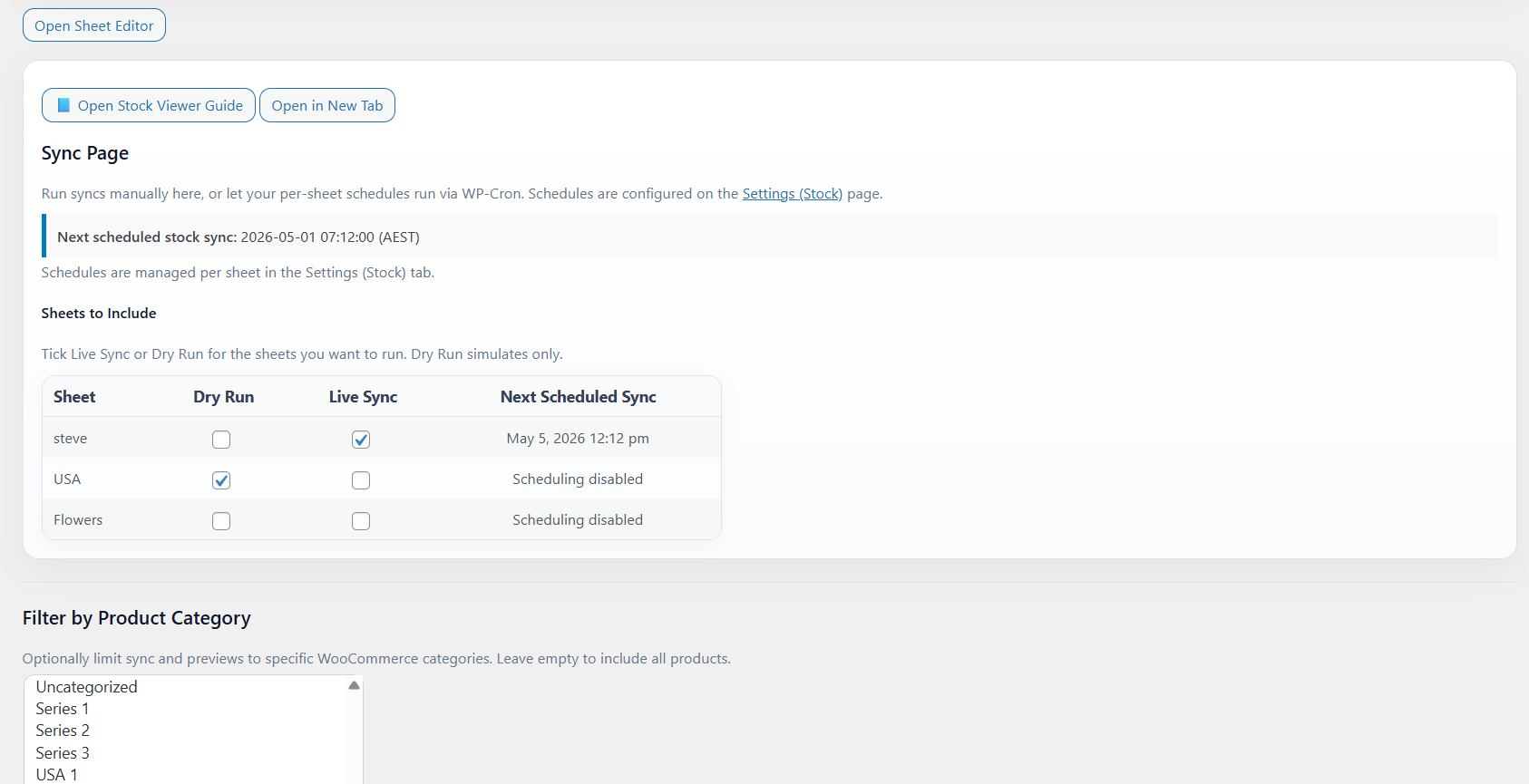
Focused stock sync workflow
This page explains the focused Google Sheets to WooCommerce stock sync workflow. For the full WooCommerce and Google Sheets system, visit the WooCommerce Google Sheets integration page.
How the Google Sheets to WooCommerce stock sync workflow works
The safest workflow is not blind automation. Set up your sheet, map the fields, preview the results, review uncertain matches, then apply stock changes when the output looks right.
Connect your Google Sheet
Add the sheet, tab name, row range, and stock-related columns used for matching and quantity updates.
Map product identity fields
Use configured fields such as SKU, product ID, model code, product name, or other mapped identifiers.
Run a Dry Run
Preview what will happen before the plugin updates live WooCommerce stock.
Review and sync
Approve uncertain matches, check logs, then run the live stock sync when ready.
Use Google Sheets as a practical WooCommerce stock source
Many stores already use Google Sheets to track supplier stock, warehouse stock, incoming inventory, shared team stock notes, or internal product planning.
Stock Sync Sheets connects that spreadsheet workflow to WooCommerce so stock values can move from Google Sheets into your store without copying quantities product by product.
- ✔Use Google Sheets for stock quantities
- ✔Map rows to WooCommerce products
- ✔Use Dry Run before live updates
- ✔Check logs after each stock sync
Why review controls matter
Stock sync is risky when the wrong row updates the wrong product. That can lead to overselling, hidden stock problems, and manual cleanup.
Stock Sync Sheets is built around review controls so you can check sheet data and product matches before live WooCommerce stock is changed.
- ✔Dry Run before live product updates
- ✔Manual Review for uncertain matches
- ✔Confirmed Matches for repeat syncs
- ✔Ignored and Blacklist controls for unwanted matches
What stock data can come from Google Sheets?
Your exact setup depends on how your sheet is structured, but a stock sync workflow usually needs product identity and stock values.
Product identity
Use fields such as SKU, product ID, model code, product name, or configured matching fields to connect rows to products.
Stock quantity
Use a mapped quantity column to update WooCommerce stock values from your Google Sheet.
Stock status
Update stock status based on the mapped quantity or stock-related values in your sheet workflow.
Sheet grouping
Use multiple sheets, suppliers, tabs, row ranges, and category filters where your setup requires them.
Google Sheets to WooCommerce stock sync compared with manual updates
Manual editing can work for a few products. It becomes slow and risky when your catalog, supplier sheets, or stock changes grow.
| Workflow | Manual WooCommerce editing | Google Sheets to WooCommerce stock sync |
|---|---|---|
| Updating many products | Slow product-by-product editing. | Use mapped sheet rows to update stock faster. |
| Supplier sheet changes | Copy values manually into WooCommerce. | Use the sheet as the stock source. |
| Preview before changes | Depends on manual checking. | Dry Run previews likely updates before live sync. |
| Uncertain product matches | Manual lookup and correction. | Manual Review can hold uncertain matches before syncing. |
| Repeat matching | Repeated lookup work. | Confirmed matches can improve future sync runs. |
| Logs | No stock sync log. | Logs help show what was found, changed, skipped, or reviewed. |
Who this workflow is for
Google Sheets to WooCommerce stock sync is useful when a spreadsheet is already part of how your store manages inventory.
Supplier stock sheets
Use supplier-provided or internally prepared stock sheets as the source for WooCommerce stock updates.
Warehouse stock sheets
Use a warehouse or inventory team sheet to update WooCommerce stock values.
High-SKU stores
Reduce repetitive stock editing when many products need regular updates.
Shared team stock files
Use one shared sheet as the stock reference for staff, suppliers, and WooCommerce workflows.
Need the reverse direction too?
Google Sheets to WooCommerce stock sync handles the sheet-to-store direction. Stock Sync Sheets also supports workflows that push WooCommerce data back to Google Sheets.
Sheet Push can send stock and product-related data back to your sheet, while Push on Sale can update Google Sheets when WooCommerce orders reduce stock.
If you also need WooCommerce sales to update your spreadsheet after orders, see Sheet Push for WooCommerce to Google Sheets.
- ✔Google Sheets to WooCommerce stock sync
- ✔WooCommerce to Google Sheets Sheet Push
- ✔Push on Sale after orders reduce stock
- ✔Better shared sheet workflows
Watch the stock sync walkthrough
Watch the Stock Sync video before connecting your own Google Sheet and WooCommerce store.
Stock Sync walkthrough
See how stock sync fits into the wider Stock Sync Sheets workflow, including settings, preview, and stock updates.
- ✔Understand the stock sync workflow
- ✔See where setup and preview fit
- ✔Use the demo and guides before buying
Helpful Google Sheets to WooCommerce resources
These pages explain the connected workflows around stock sync, sheet push, product building, price sync, and plugin comparison.
Plugin overview
See the Stock Sync Sheets plugin overview covering WooCommerce Google Sheets stock sync, Dry Run, Manual Review, Product Builder, AI Review, schedules, and Push on Sale.
Stock Sync
Learn how WooCommerce stock sync from Google Sheets works with Dry Run, Manual Review, logs, schedules, and matching controls.
Sheet Push
See how WooCommerce stock and product-related data can be pushed back to Google Sheets.
Push on Sale
Learn how WooCommerce sale stock changes can be pushed back to Google Sheets in real time.
Product Builder
Create and update WooCommerce products from mapped Google Sheet data.
Plugin comparison
Compare WooCommerce stock sync plugin workflows before choosing a system for your store.
Related WooCommerce stock sync guides
Use these guides to compare connected WooCommerce and Google Sheets stock workflows before choosing the best setup for your store.
WooCommerce Inventory Sync with Google Sheets
See how Google Sheets can support WooCommerce inventory sync for supplier stock, warehouse counts, internal sheets, and shared stock workflows.
WooCommerce Bulk Stock Update from Google Sheets
Learn how bulk stock updates can be handled from a spreadsheet workflow with previews, matching controls, and safer update steps.
WooCommerce Stock Import with Dry Run
Understand why Dry Run matters before importing stock changes, especially when using supplier sheets, large catalogs, or new mappings.
WooCommerce Stock Sync with Manual Review
See how Manual Review helps prevent bad product matches by letting you inspect uncertain rows before live WooCommerce stock is updated.
Supplier Stock Sheets to WooCommerce
Learn how supplier stock sheets can feed WooCommerce stock workflows when your product availability comes from external spreadsheet data.
Multi-Store WooCommerce Inventory with Google Sheets
Use Google Sheets as a shared inventory source for stores or teams that need stock values visible outside one WooCommerce admin screen.
WooCommerce Stock Sync Without Coding
Learn how store owners can connect WooCommerce stock and Google Sheets without building a custom integration from scratch.
Google Sheets to WooCommerce Stock Sync FAQs
Can I sync stock from Google Sheets to WooCommerce?
Yes. Stock Sync Sheets can sync stock from mapped Google Sheet rows into WooCommerce products using configured product matching and stock fields.
Can I preview Google Sheets stock changes before updating WooCommerce?
Yes. Dry Run lets store owners preview likely stock changes before live WooCommerce products are updated.
What happens if a Google Sheets row does not clearly match a WooCommerce product?
Uncertain matches can go to Manual Review so the store owner can choose the correct WooCommerce product before stock changes are applied.
Can WooCommerce push sales back to Google Sheets?
Yes. Push on Sale can update Google Sheets when WooCommerce sales reduce stock, helping the shared sheet stay fresher after orders.
Can I sync stock on a schedule?
Yes. Scheduled syncs can be used after the sheet settings, product matching, Dry Run output, and workflow have been tested.
Is Google Sheets stock sync safer than manual editing?
It can be, if the workflow uses clean sheet data, good product matching, Dry Run, Manual Review, and logs before live updates.
Start syncing stock from Google Sheets to WooCommerce
Use Stock Sync Sheets to connect your spreadsheet stock workflow with WooCommerce, preview updates, review uncertain matches, and apply stock changes with more control.