
30-Day Money-Back Guarantee — Try Stock Sync Sheets Risk Free

⚡ Stock Sync Sheets

Stock Sync Sheets for WooCommerce stock sync from Google Sheets

WooCommerce stock sync from Google Sheets

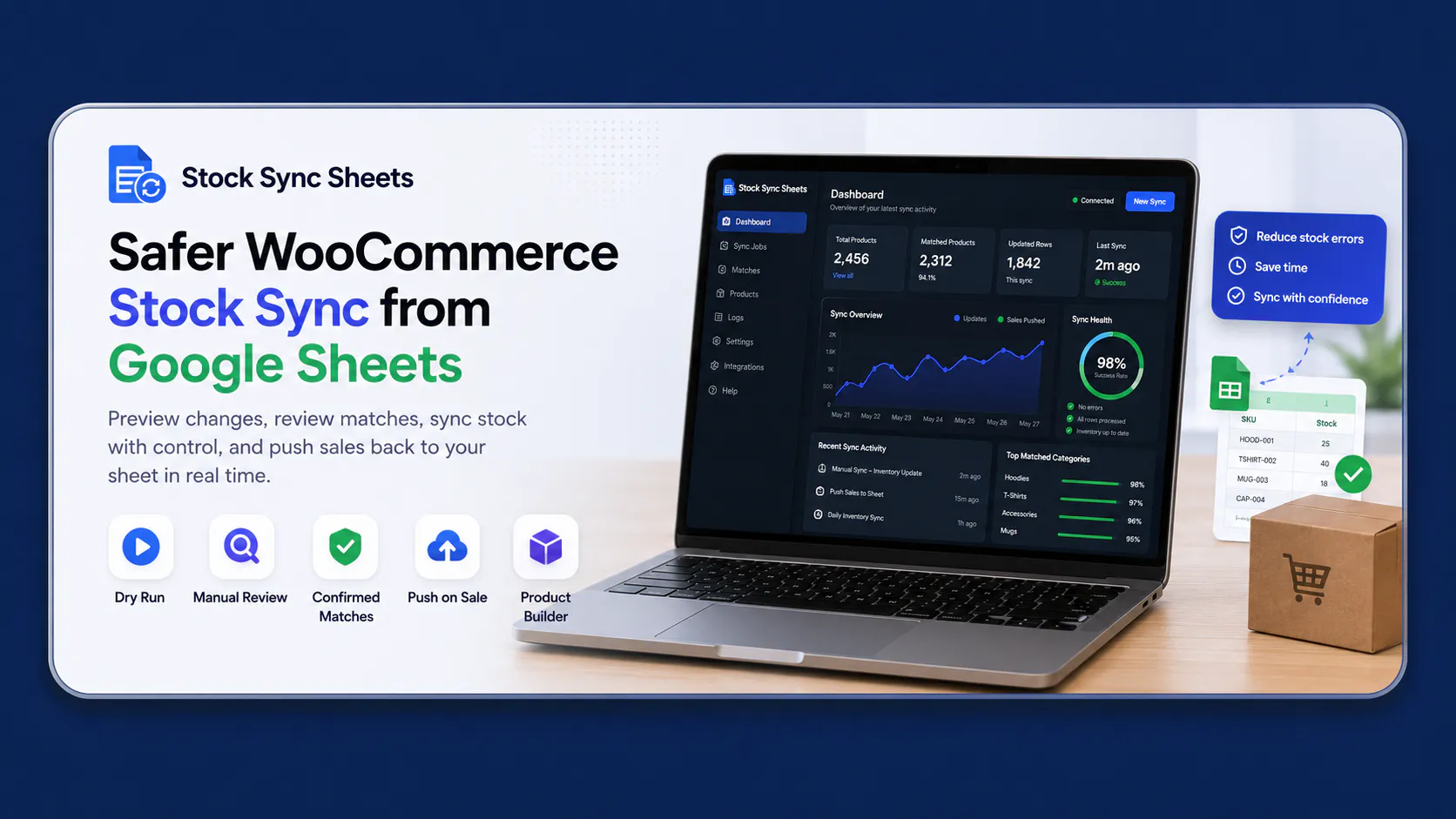
Use Stock Sync Sheets to sync WooCommerce stock from Google Sheets, preview changes before live updates, and push sales back to Google Sheets in real time.

First, use Google Sheets as your stock source and run a Dry Run before live updates.

Next, review uncertain matches, save confirmed matches, and manage ignored or blacklisted items.

Then, use schedules, Sheet Push, and Push on Sale to keep shared sheet workflows moving.

  • Sync WooCommerce stock quantities and stock status from Google Sheets
  • Preview changes with Dry Run before live updates
  • Review uncertain product matches before syncing
  • Push WooCommerce sales back to Google Sheets in real time
  • Use schedules, logs, confirmed matches, ignored items, and blacklist controls
  • Extend the same workflow with Product Builder and AI Review when needed
Built for WooCommerce
Google Sheets stock workflow
Dry Run before live sync
Real-time Push on Sale
Stock Sync Sheets WooCommerce stock sync from Google Sheets page
Dry Run first Preview stock changes before live updates.
Manual Review Check uncertain matches before syncing.
Push on Sale Sales update Google Sheets in real time.
Scheduled Syncs Automate tested stock workflows.

Built for supplier stock sheets and shared inventory

Use Stock Sync Sheets when your WooCommerce stock values already live in Google Sheets, supplier spreadsheets, warehouse sheets, or shared team stock files.

  • Supplier stock sheet to WooCommerce
  • Google Sheets inventory sync
  • Multi-store shared stock workflows
  • Prevent overselling with checked stock updates
  • Replace repeated CSV stock imports
  • Review product matches before live changes
🏭
Supplier stock sheets Use supplier or warehouse stock files as the source for WooCommerce stock updates.
🌐
Shared inventory workflows Keep a shared Google Sheet at the centre of team, warehouse, or multi-store stock processes.
📥
CSV import replacement Move away from repeated manual CSV stock imports and use previewed sheet-based updates instead.
🔍
Checked stock updates Preview rows, confirm matches, and review unclear products before live stock changes happen.

Need the focused Push on Sale guide?

Read the Push WooCommerce Sales Back to Google Sheets guide to see how WooCommerce sale stock changes can update Google Sheets in real time after orders.

How Stock Sync Sheets works

Stock Sync Sheets keeps the stock workflow simple. First, connect your sheet. Next, preview changes. Then, run the live sync when the results are clear.

Do not enable schedules before testing

Run Load Sheet Preview first. Then run Dry Run. Resolve Manual Review items. Check Confirmed Matches. Only enable scheduled syncs after the first workflow is clean.

Connect Google Sheets

Add your sheet ID, tab name, row range, stock quantity column, and matching fields.

Run a Dry Run

Preview likely changes before WooCommerce stock is updated.

Review matches

Confirm correct products, ignore unwanted rows, or blacklist bad matches.

Sync or schedule

Run a live sync manually, enable schedules, or use Push on Sale for real-time sale-to-sheet updates.

Stock Sync Sheets updates WooCommerce stock directly from Google Sheets

Many stores already use spreadsheets for stock, suppliers, warehouses, and product workflows.

Stock Sync Sheets connects that process to WooCommerce without forcing your team into a heavy inventory system.

As a result, your team can keep using Google Sheets while WooCommerce receives the stock updates your workflow allows.

  • Sync stock quantities from Google Sheets to WooCommerce
  • Update stock status based on mapped sheet values
  • Use SKU, product ID, model code, name, or configured fields
  • Configure multiple sheets, suppliers, tabs, and row ranges
  • Run manual syncs or scheduled stock syncs
📄
Google Sheet Your stock, quantity, SKU, product ID, model code, and supplier data.
🧪
Dry Run Preview the stock sync before live WooCommerce changes happen.
🛒
WooCommerce Stock quantity and stock status update after approved sync actions.
Push on Sale Sales can update your Google Sheet in real time when stock is reduced.
1
Customer buys from WooCommerce The order reduces stock in your WooCommerce store.
2
Push on Sale runs The stock change is sent back to Google Sheets in real time.
3
Your sheet stays current The shared stock source reflects the WooCommerce sale faster.
4
Connected workflows use fresher stock Stores or teams can keep working from the updated sheet source.

Stock Sync Sheets supports real-time Push on Sale

Basic stock sync tools usually pull data one way: Google Sheets to WooCommerce.

However, Stock Sync Sheets also supports the reverse workflow.

When a WooCommerce sale reduces stock, Push on Sale can update Google Sheets in real time.

As a result, your shared stock sheet does not become stale after orders.

  • Real-time sale-to-sheet stock updates
  • Better shared inventory workflows
  • Less manual sheet editing after orders
  • Useful for multi-store and supplier-sheet setups

Dry Run before live stock updates

Dry Run is one of the safest parts of Stock Sync Sheets. It lets you check the expected result before your live WooCommerce stock changes.

Do not run live updates blind

First, run a Dry Run. Next, check the preview and sync log. Then, review uncertain matches. Finally, run the live sync when the results are correct.

Helps reduce overselling from stale stock data

Overselling often happens when WooCommerce, supplier sheets, staff spreadsheets, and shared stock files are not aligned. Stock Sync Sheets helps reduce that risk by letting you preview stock values, confirm matches, run scheduled updates, and use Push on Sale to send WooCommerce stock reductions back to Google Sheets.

🧭

Check mappings first

Confirm the right sheet columns are being used for stock quantities, stock status, and matching fields.

🔍

Catch unclear rows

Send uncertain products to Manual Review before live stock updates affect WooCommerce.

📋

Read the sync log

See matched, updated, skipped, no-match, warning, and error rows in one place.

Go live with confidence

Run live syncs after reviewing the Dry Run output and resolving unclear matches.

What the Stock Sync Sheets page shows

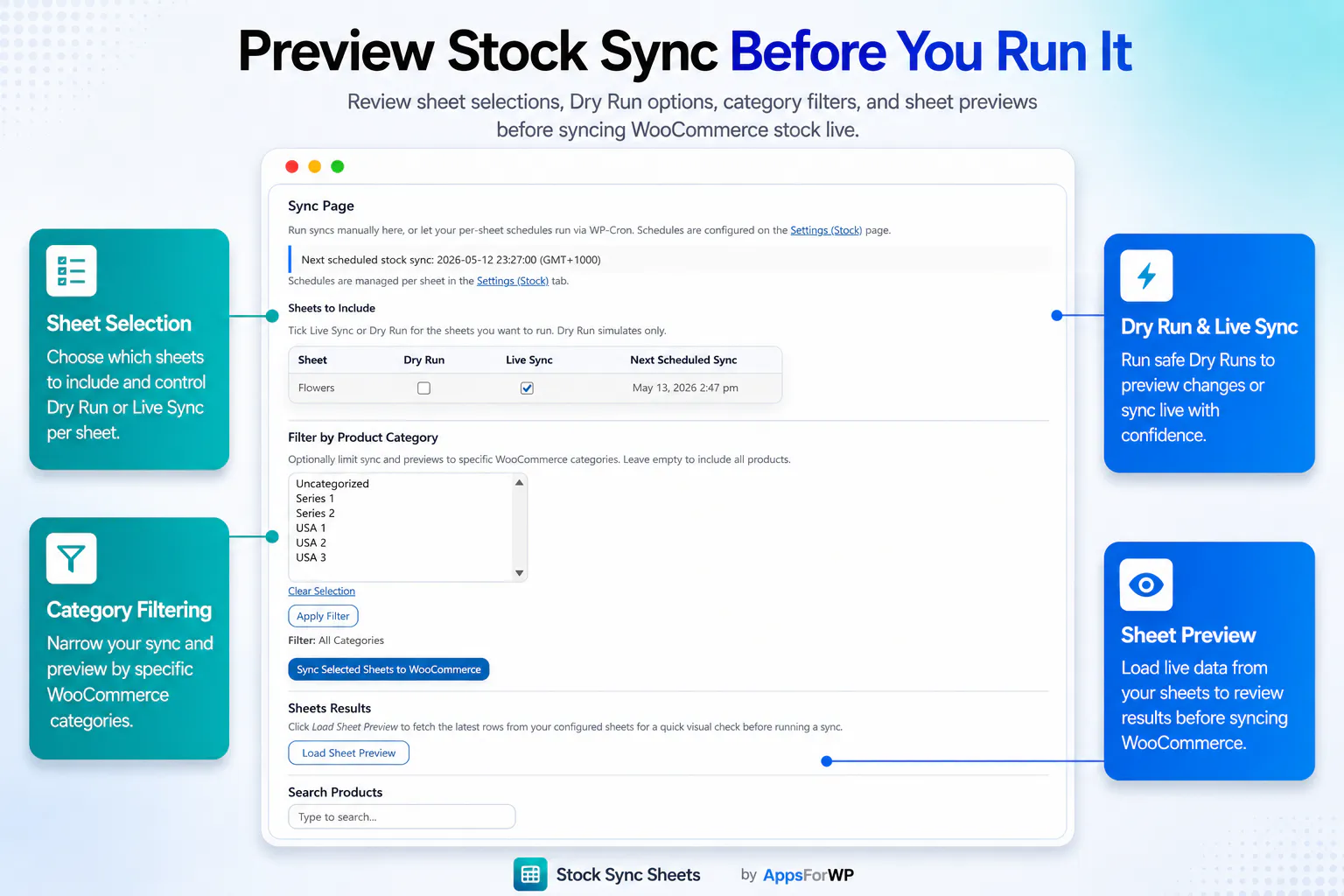
The Stock Sync page is the main screen for sheet rows, Dry Run, Live Sync, logs, and manual product matches.

Stock sync controls

The page keeps the important sync controls visible.

Therefore, store owners can choose what to include, what to preview, and when to run live updates.

  • Sheets to Include table
  • Dry Run and Live Sync options
  • Scheduled sync status
  • Load Sheet Preview button
  • Product search preview area

Review and troubleshooting tools

Stock Sync Sheets does not leave you guessing.

Instead, logs and review areas show what happened and what needs attention.

  • Sync Log with matched rows
  • Updated, skipped, no-match, warning, and error entries
  • Pending Manual Product Matches
  • Confirmed match workflow
  • Ignored and blacklist controls

See Stock Sync Sheets in action

This screenshot shows how sheet data can be previewed before import or update workflows are trusted with live store changes.

Stock Sync Sheets preview product data before import screenshot
Preview product and stock data before relying on live WooCommerce updates.

Helpful setup screenshots for spreadsheet workflows

These screenshots show cleaner sheet setup, mapping, image preparation, grouped product data, and Product Builder settings that can support the wider Stock Sync Sheets workflow.

Stock Sync Sheets grouped product sheet setup example screenshot

Grouped product sheet setup

Use this setup when grouped products need clear parent and child product relationships in the spreadsheet.

Stock Sync Sheets product image setup guide infographic screenshot

Product image setup guide

Use this guide when product workflows need featured image and gallery image URLs prepared before import or update steps.

Stock Sync Sheets Product Builder easy to map screenshot

Easy Product Builder mapping

Map spreadsheet columns to product fields so the store workflow is easier to check before live changes.

Stock Sync Sheets fine tune Product Builder settings screenshot

Fine tune Product Builder settings

Adjust Product Builder settings before using spreadsheet data for larger WooCommerce product workflows.

Stock Sync Sheets preview product data before import screenshot

Preview product data before import

Check the data first so stock, product, image, and matching workflows are easier to trust before going live.

Watch the Stock Sync Sheets videos

These walkthroughs show the core stock sync workflow, settings, confirmed matches, ignored items, and blacklist controls.

📦

Stock Sync Sheets stock sync

See how stock data moves from Google Sheets into WooCommerce and how users review sync results.

⚙️

Stock Sync Sheets settings

Walk through the stock sync settings page and understand the configuration options used by the sync workflow.

Confirmed, ignored and blacklist controls

Learn how confirmed matches, ignored items, and blacklist controls help prevent repeated matching problems.

Variation-aware stock workflows

Stock Sync Sheets can support variation-aware stock workflows when your Google Sheet and WooCommerce products are structured correctly.

Variation support depends on correct sheet structure

Stock Sync Sheets can work with mapped variation-related sheet data such as product type, parent SKU, parent ID, product ID, SKU, and variation attributes.

For best results, variation rows should have clear product identity fields and the correct parent relationship data.

🧬

Variation-related mapped fields

Use product type, parent SKU, parent ID, SKU, product ID, and variation attributes where your workflow needs variation-aware matching.

🎯

More precise matching

Correct variation identity helps reduce parent-versus-variation confusion.

📋

Preview before live updates

Dry Run and Sheet Preview are especially important when syncing stock for variation rows.

Confirm difficult matches

Unclear variation matches can go to Manual Review before live syncing.

Stock Sync Sheets is more than a simple importer

This is one of the biggest differences. Stock Sync Sheets gives you workflow control around stock syncing, not just a one-way import button.

📥

Not just import and hope

Review likely changes first and handle uncertain matches before they go live.

🧠

Gets cleaner over time

As you confirm matches, future syncs become faster and more reliable.

🔗

Built for ongoing workflows

Stock syncing becomes part of a broader Google Sheets workflow for suppliers, warehouses, and stores.

⚙️

Better control before live updates

Use Dry Run, Manual Review, confirmed matches, ignored items, blacklist controls, schedules, Sheet Push, and Push on Sale.

Stock Sync Sheets features

These features make WooCommerce stock syncing practical, safer, and easier for real spreadsheet-based businesses.

📊

Google Sheets stock sync

Sync WooCommerce stock quantities and stock status from one or more Google Sheets.

🧪

Dry Run mode

Preview likely changes before running a live sync.

📝

Manual Review controls

Review unclear matches, search WooCommerce products, and approve the right product before syncing live.

Confirmed Matches

Save approved matches so future syncs become faster, cleaner, and more reliable.

🚫

Ignored and Blacklist controls

Ignore rows and blacklist bad match pairs so the same mistake does not keep repeating.

📚

Multiple sheets and suppliers

Configure separate sheet sources, tabs, row ranges, and supplier workflows inside one plugin.

⏲️

Scheduled Syncs

Run stock updates automatically after your workflow has been tested.

Real-time Push on Sale

Update Google Sheets in real time when WooCommerce sales reduce stock.

📤

Sheet Push

Push WooCommerce stock and product-related data back to Google Sheets.

🛒

Product Builder included

The main plugin also includes Product Builder for mapped sheet product workflows.

🤖

AI Review included

Use optional AI-assisted product content and SEO drafts from the Product Builder workflow.

Safe stock sync controls at a glance

Stock Sync Sheets gives store owners practical controls around preview, review, logs, schedules, and real-time sale-to-sheet updates.

Control Why it matters
Dry Run Lets you check expected stock changes before WooCommerce is updated.
Sheet Preview Helps you inspect selected sheet rows and mapped data before relying on the sync.
Manual Review Gives unclear rows a review step instead of forcing risky automatic updates.
Confirmed Matches Saves approved matches so repeated rows become easier and cleaner to sync.
Ignored Items Lets you keep specific rows or codes out of automatic matching when needed.
Blacklist Controls Blocks known bad match pairs so incorrect auto-matches do not keep repeating.
Scheduled Sync Runs stock updates on a schedule after your setup has been tested.
Push on Sale Updates Google Sheets in real time when WooCommerce sales reduce stock.
Sync Log Shows matched, updated, skipped, no-match, warning, and error rows.

Who Stock Sync Sheets is built for

Stock Sync Sheets is designed for businesses that already manage stock in spreadsheets and want a cleaner WooCommerce inventory workflow.

🏭

Supplier-driven stores

Useful for stores that receive stock data from suppliers, warehouses, or internal spreadsheet systems.

📦

High-SKU WooCommerce shops

Ideal when manual updates across many products become too slow and too easy to get wrong.

🌍

Multi-store inventory workflows

Useful for businesses trying to manage shared stock across one or multiple WooCommerce stores.

🙌

No-code merchants

Set up practical stock automation without custom development or complicated integrations.

What is included in Stock Sync Sheets

The core plugin includes more than basic stock importing. It supports a broader Google Sheets workflow for WooCommerce.

📌

Included in the core plugin

Stock Sync, Dashboard, Dry Run, Manual Review, Confirmed Matches, Ignored and Blacklist controls, Scheduled Syncs, Push on Sale, Sheet Push, Sheet Editor, Product Builder, and AI Review are included.

Price Sync is separate

Regular price and sale price syncing from Google Sheets is handled by the separate Price Sync Add-On.

🎯

Built for broader sheet workflows

Use Stock Sync Sheets when you need stronger spreadsheet-driven workflows around stock, products, AI drafts, and shared inventory.

Simple pricing

Buy Stock Sync Sheets through WooCommerce.com with updates, support, and a 30-day refund policy.

Best for getting started

1-Year License

$49 USD

12 months of updates and support, plus a 30-day money-back guarantee.

Buy on WooCommerce.com

Related WooCommerce stock sync guides

These related pages explain the wider WooCommerce stock sync workflow, including comparisons, Dry Run, Manual Review, supplier sheets, multi-store inventory, REST API alternatives, and no-code setup options.

FlexStock Alternative

Compare Stock Sync Sheets as a FlexStock alternative for WooCommerce stores that need Google Sheets stock sync, Dry Run, Manual Review, Product Builder, and Push on Sale.

⚖️

WooCommerce Stock Sync Plugin Comparison

Compare WooCommerce stock sync plugin workflows by Google Sheets support, matching controls, preview safety, manual review, and ongoing store-management features.

🔁

Google Sheets to WooCommerce Stock Sync

Learn how stock data can move from Google Sheets into WooCommerce using a spreadsheet-first workflow instead of product-by-product manual editing.

📊

WooCommerce Inventory Sync with Google Sheets

See how Google Sheets can support WooCommerce inventory sync when stock data comes from suppliers, warehouses, shared files, or internal team workflows.

🧮

WooCommerce Bulk Stock Update from Google Sheets

Learn how bulk stock updates can be handled from Google Sheets with preview, matching, and review controls before live product stock is changed.

🧪

WooCommerce Stock Import with Dry Run

Understand why Dry Run matters before importing stock changes from Google Sheets, especially when testing new supplier sheets or large stock updates.

📝

WooCommerce Stock Sync with Manual Review

See how Manual Review helps prevent bad stock updates by letting store owners inspect uncertain product matches before live sync actions run.

🏭

Supplier Stock Sheets to WooCommerce

Learn how supplier stock sheets can feed WooCommerce stock workflows when availability, quantities, or catalog data come from external spreadsheet sources.

🌐

Multi-Store WooCommerce Inventory with Google Sheets

Use Google Sheets as a shared inventory source for multi-store WooCommerce workflows, teams, or stock systems that need a central spreadsheet reference.

🔌

WooCommerce Google Sheets REST API Alternative

See when a custom REST API integration makes sense, and when a no-code WooCommerce Google Sheets stock sync workflow is safer to manage.

🙌

WooCommerce Stock Sync Without Coding

Learn how WooCommerce store owners can connect Google Sheets stock workflows without building a custom integration or editing code.

Stock Sync Sheets FAQs

What does Stock Sync Sheets do?

Stock Sync Sheets syncs WooCommerce stock quantities and stock status from Google Sheets. It also includes Dry Run, Manual Review, Confirmed Matches, Ignored and Blacklist controls, scheduled syncs, Sheet Push, real-time Push on Sale, Product Builder, AI Review, logs, and broader spreadsheet workflow tools.

Can I preview changes before live stock updates?

Yes. Dry Run mode lets you review likely stock changes before running a live sync.

What does the Stock Sync page show?

The Stock Sync page shows sheet controls, Dry Run, Live Sync, scheduled sync status, Sheet Preview, product search preview, Sync Log, and Pending Manual Product Matches.

What happens if a row does not match clearly?

Unclear rows can go into Manual Review so you can choose the correct WooCommerce product and save the match for future syncs.

Does Stock Sync Sheets support multiple sheets or suppliers?

Yes. You can configure one or more sheet sources and manage separate supplier, warehouse, or stock-source workflows.

Can Stock Sync Sheets work with variation-aware stock workflows?

Yes, where your sheet and WooCommerce products are structured correctly. It can work with mapped variation-related sheet data such as product type, parent SKU, parent ID, product ID, SKU, and variation attributes.

Can I sync multiple WooCommerce stores with one Google Sheet?

Yes. Shared-sheet workflows can help multiple WooCommerce stores work from the same Google Sheet and stay better aligned.

What is Push on Sale in Stock Sync Sheets?

Push on Sale updates Google Sheets in real time when WooCommerce sales reduce stock. This helps shared inventory workflows stay current after orders. Read the Push WooCommerce Sales Back to Google Sheets guide for the focused workflow.

Is Price Sync included in Stock Sync Sheets?

No. Price Sync is available as a separate add-on. The main plugin includes stock sync, Dashboard, Dry Run, Manual Review, Confirmed Matches, Ignored and Blacklist controls, Sheet Push, Push on Sale, Sheet Editor, Product Builder, and AI Review.

Use Stock Sync Sheets to stop updating WooCommerce stock by hand

Connect your Google Sheets workflow to WooCommerce, preview changes before live updates, review uncertain matches, and push sale-based stock changes back to Google Sheets in real time.