

Create WooCommerce Products from Google Sheets
AI content drafts and review-first product building
Create WooCommerce products from Google Sheets using mapped rows, Product Builder, Sheet Preview, AI-assisted content drafts, SEO drafts, and review-first import steps.
Use your mapped sheet data to create or update products, then let AI help draft product titles, short descriptions, long descriptions, bullet features, SEO titles, meta descriptions, and focus keyphrases. Everything is staged for review before import, so you stay in control.
Why Product Builder AI matters
- ✔Save hours writing product descriptions, short descriptions, and feature bullets
- ✔Generate SEO titles, meta descriptions, and focus keyphrases from mapped sheet data
- ✔Create WooCommerce products from Google Sheets faster with mapped rows
- ✔Stage AI drafts in AI Review before anything is imported live
- ✔Use your own OpenAI API key — no AI credit markup or commission
- ✔Support simple, variable, variation, grouped, external, virtual, and downloadable workflows
Create WooCommerce products from Google Sheets faster
Product Builder is a WooCommerce catalog workflow for mapped Google Sheet rows. Use it to create products from Google Sheets, prepare product updates, and use AI to draft the time-consuming content and SEO fields that normally slow everything down.
New to Product Builder?
Read the WooCommerce Product Builder from Google Sheets guide to see how Product Builder creates and updates products from mapped sheet rows, including images, attributes, variations, AI Review, and SEO drafts.
Create WooCommerce products and AI content drafts from one workflow
Writing product copy is one of the slowest parts of catalog building. Product Builder AI helps turn mapped sheet data into staged drafts so you are reviewing and improving content instead of starting every product from a blank page.
For deeper setup details, see how to create AI product descriptions from Google Sheets before reviewing and importing product drafts.
The problem: product content takes too long
Creating products is not just filling in a name and SKU. Real WooCommerce products often need titles, short descriptions, long descriptions, bullet features, categories, images, SEO titles, meta descriptions, and focus keyphrases.
Doing that manually across dozens or hundreds of products is slow, repetitive, and easy to put off.
The AI workflow: draft first, review second
- ✔AI drafts product titles from mapped sheet data
- ✔AI drafts short descriptions for product cards and summaries
- ✔AI drafts longer product descriptions for the product page
- ✔AI drafts customer-facing bullet features
- ✔AI drafts SEO titles, meta descriptions, and focus keyphrases
- ✔You review the drafts before importing approved content
Why store owners create WooCommerce products from Google Sheets
When product data already lives in Google Sheets, re-entering it manually into WooCommerce wastes time and creates inconsistency. Product Builder helps turn that spreadsheet into a workflow to create WooCommerce products from Google Sheets, update catalog data, draft AI content, and review changes before import.
Create WooCommerce products from Google Sheets
Build new WooCommerce products from spreadsheet data instead of manually creating each product inside WooCommerce.
Use AI to draft product content
Generate staged titles, descriptions, feature bullets, and SEO fields from your mapped sheet data so you are editing drafts instead of writing everything from scratch.
Update existing products from the same workflow
Use Product Builder to update existing product data from the same sheet-based workflow as your catalog changes.
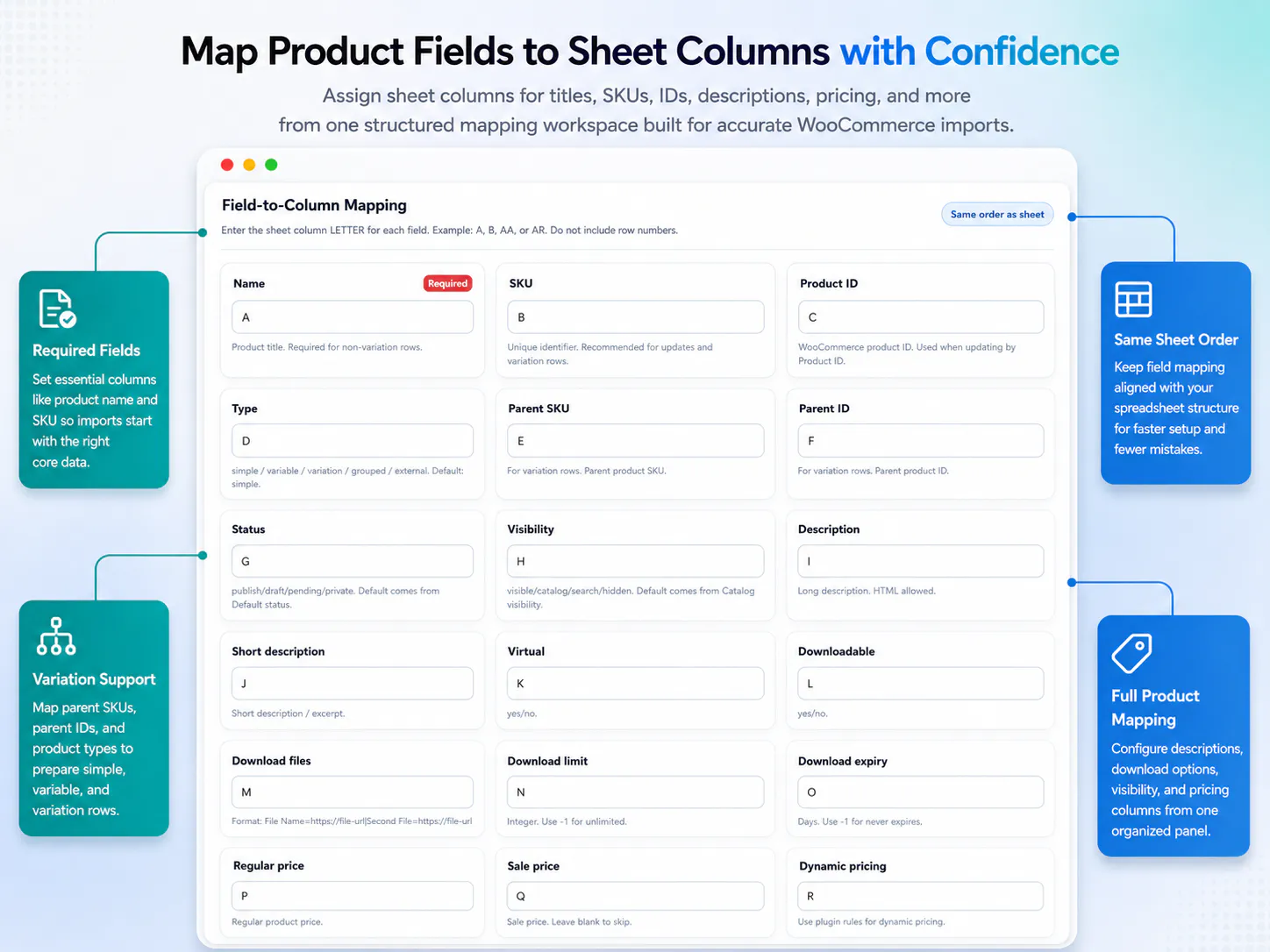
Map fields from sheet columns
Map your sheet columns to WooCommerce product fields so product identity, stock, images, categories, tags, attributes, and content go where they should.
Product types you can create from Google Sheets
Product Builder is designed for sheet-driven WooCommerce product workflows. Results depend on your mapped fields, row structure, product IDs, SKUs, parent fields, and how your WooCommerce products are set up.
Simple products
Create or update standard WooCommerce products from mapped sheet fields such as name, SKU, descriptions, stock fields, categories, tags, images, and meta data.
Variable products
Use mapped product type, parent fields, default attributes, and variation-related data where your sheet structure supports variable product workflows.
Variation rows
Work with variation rows using mapped product ID, parent SKU, parent ID, variation attributes, stock fields, prices, and other variation-specific data.
Grouped products
Use grouped children mappings where your workflow needs to manage grouped product relationships from spreadsheet data.
External or affiliate products
Map external URL and button text fields for external or affiliate product workflows.
Virtual and downloadable products
Use virtual, downloadable, download files, download limit, and download expiry fields where your store sells digital or non-shipping products.
Map WooCommerce product fields from Google Sheets
Product Builder is strongest when your sheet is structured properly. You can map the fields that matter to your catalog instead of forcing every store into the same rigid import format.
Product identity
- Name
- SKU
- Product ID
- Product type
- Parent SKU
- Parent ID
- Status
- Visibility
Product content
- Description
- Short description
- Purchase note
- Menu order
- Categories
- Tags
- Featured image
- Gallery images
Pricing and stock fields
- Regular price
- Sale price
- Manage stock
- Stock quantity
- Stock status
- Sold individually
- Tax status
- Tax class
Product structure
- Attributes
- Variation attributes
- Default attributes
- Grouped children
- External URL
- Button text
- Meta JSON
Downloads and dimensions
- Virtual setting
- Downloadable setting
- Download files
- Download limit
- Download expiry
- Weight
- Length
- Width
- Height
AI and SEO drafts
- AI product title draft
- AI short description draft
- AI long description draft
- AI bullet features draft
- SEO title draft
- Meta description draft
- Focus keyphrase draft
AI-assisted product drafts with review before import
This is the feature that can save the most time. Product Builder AI helps draft the parts of product creation that usually take hours: descriptions, bullet features, SEO titles, meta descriptions, and focus keyphrases.
AI is optional, review-first, and uses your own OpenAI API key
You use your own OpenAI API key. Stock Sync Sheets does not resell AI credits, does not add usage markup, and does not take commission from AI usage. AI drafts are staged for review first, so the workflow is designed to save time without blindly overwriting live WooCommerce products.
What AI can help draft
- ✔Product titles from mapped sheet data
- ✔Short descriptions for fast product summaries
- ✔Long descriptions for product pages
- ✔Customer-facing bullet features
- ✔SEO titles for search result snippets
- ✔Meta descriptions for better listing copy
- ✔Focus keyphrases to guide on-page SEO
How this saves time without losing control
Instead of writing every product description manually, the AI workflow gives you a draft starting point. For large catalogs, that changes the job from blank-page writing to reviewing, editing, and approving.
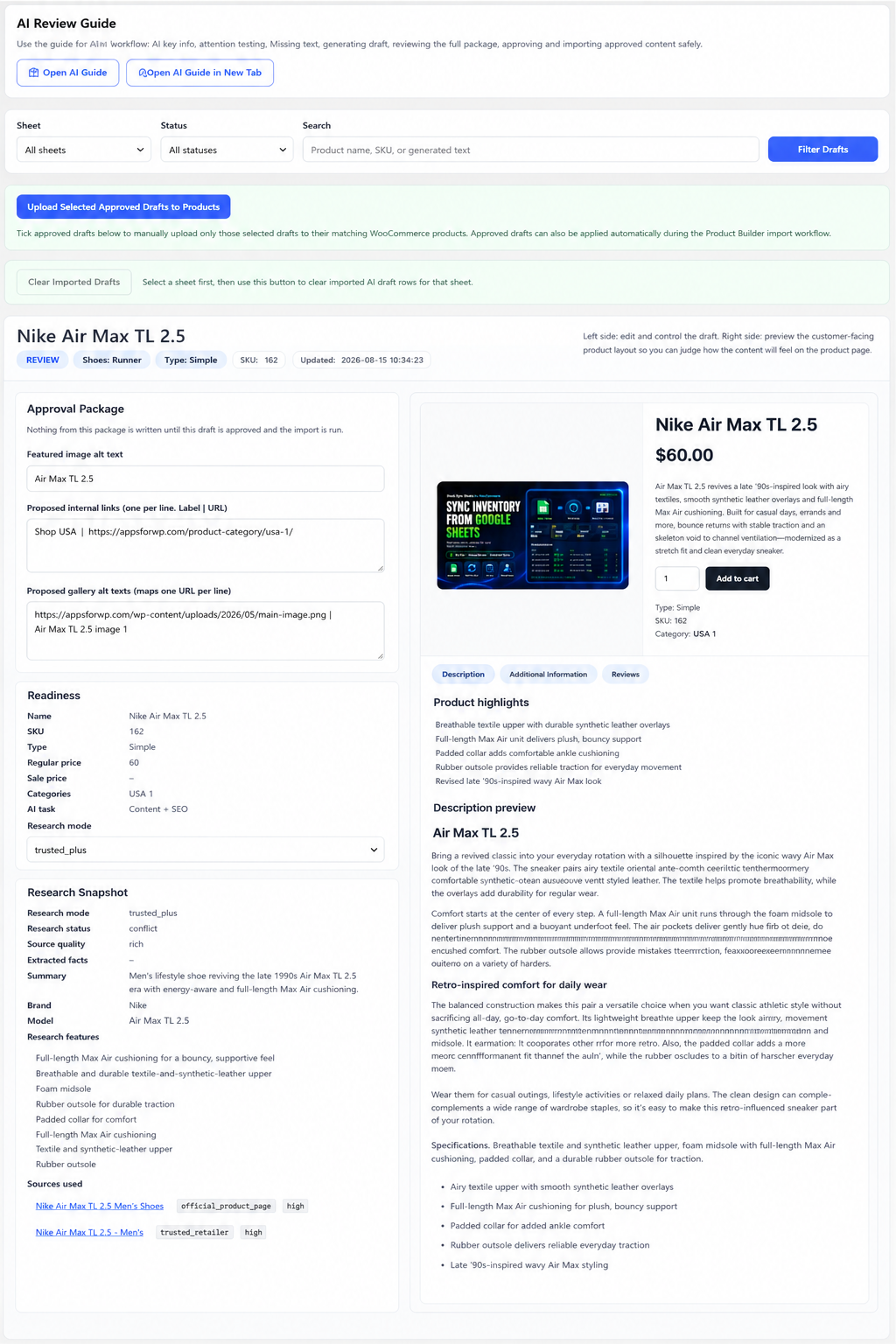
The safer workflow is: map sheet data, generate AI drafts, review staged AI output, approve the content, then run the separate import or update step. That means AI helps with the heavy lifting, but you still decide what goes live.
What AI can do for a real WooCommerce catalog
Product Builder AI is most useful when you have product data but not enough time to turn every row into polished content. It helps create better first drafts from the information you already have in your sheet.
Turn raw sheet data into readable copy
Use mapped product names, categories, attributes, specs, and notes as the starting point for descriptions that are easier for customers to understand.
Draft short and long descriptions
Create short summaries and longer product descriptions without starting from scratch for every product.
Create customer-facing feature bullets
Generate feature points that help customers scan the product faster and understand what matters.
Prepare SEO drafts at the same time
Draft SEO titles, meta descriptions, and focus keyphrases while building the product content, instead of treating SEO as another manual job later.
See Product Builder create products from Google Sheets
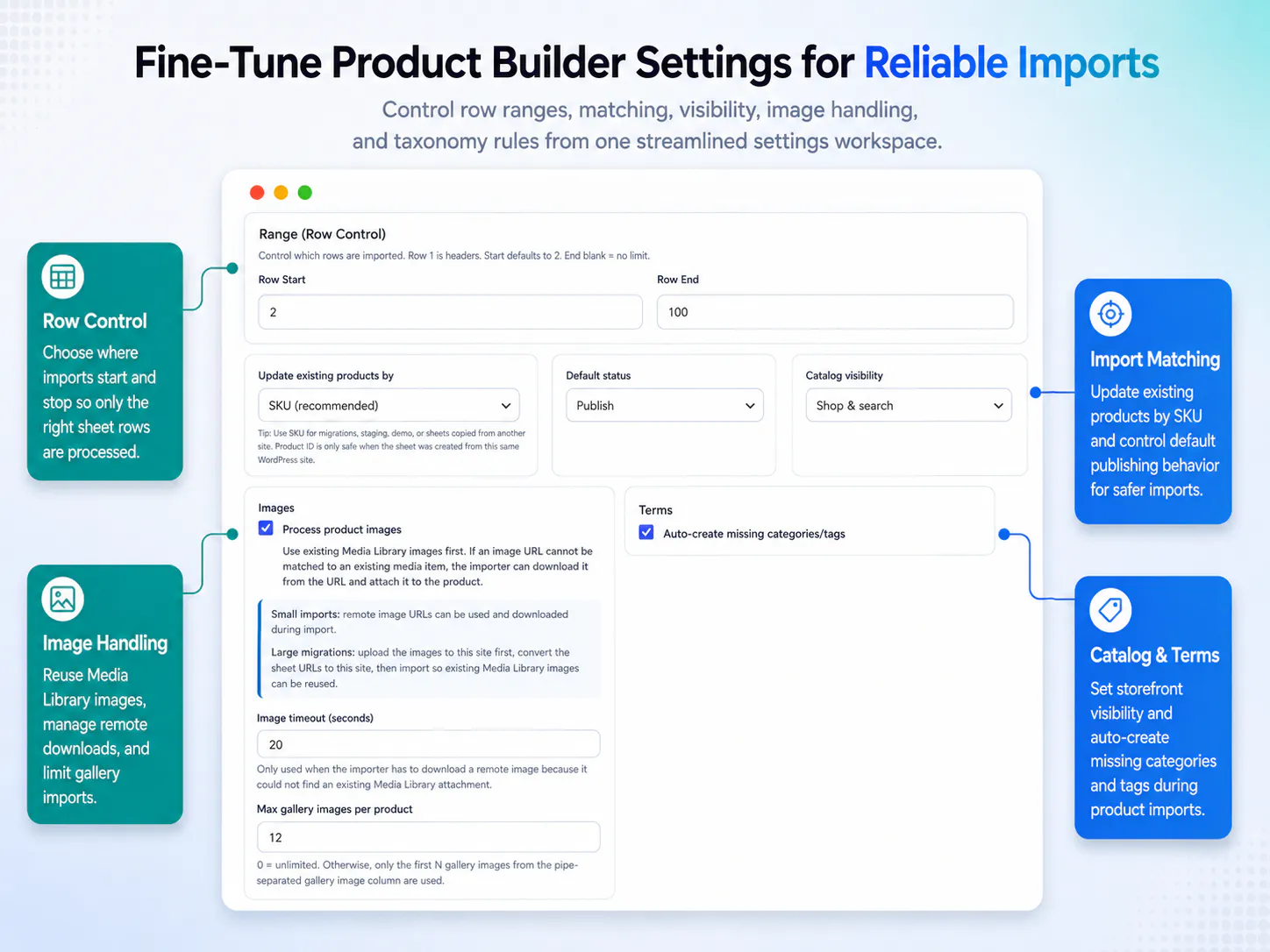
This is where merchants configure product creation, update, preview, and AI-assisted workflows from Google Sheets inside Stock Sync Sheets.
Watch how to create WooCommerce products from Google Sheets
These walkthroughs show how Product Builder works and how Product Builder AI helps stage product content and SEO drafts for review.
Stock Sync Sheets Product Builder
See how Product Builder uses mapped Google Sheet fields to create or update WooCommerce product data.
Stock Sync Sheets For WooCommerce Product Builder AI
Learn how Product Builder AI helps create staged product content and SEO drafts for review before importing anything live.
Sheet Preview and AI-assisted Preview are separate workflows
The Product Builder page is easier to understand when users know the two preview paths. One checks sheet rows and mapped product data. The other helps stage AI-generated content and SEO drafts for review.
Sheet Preview
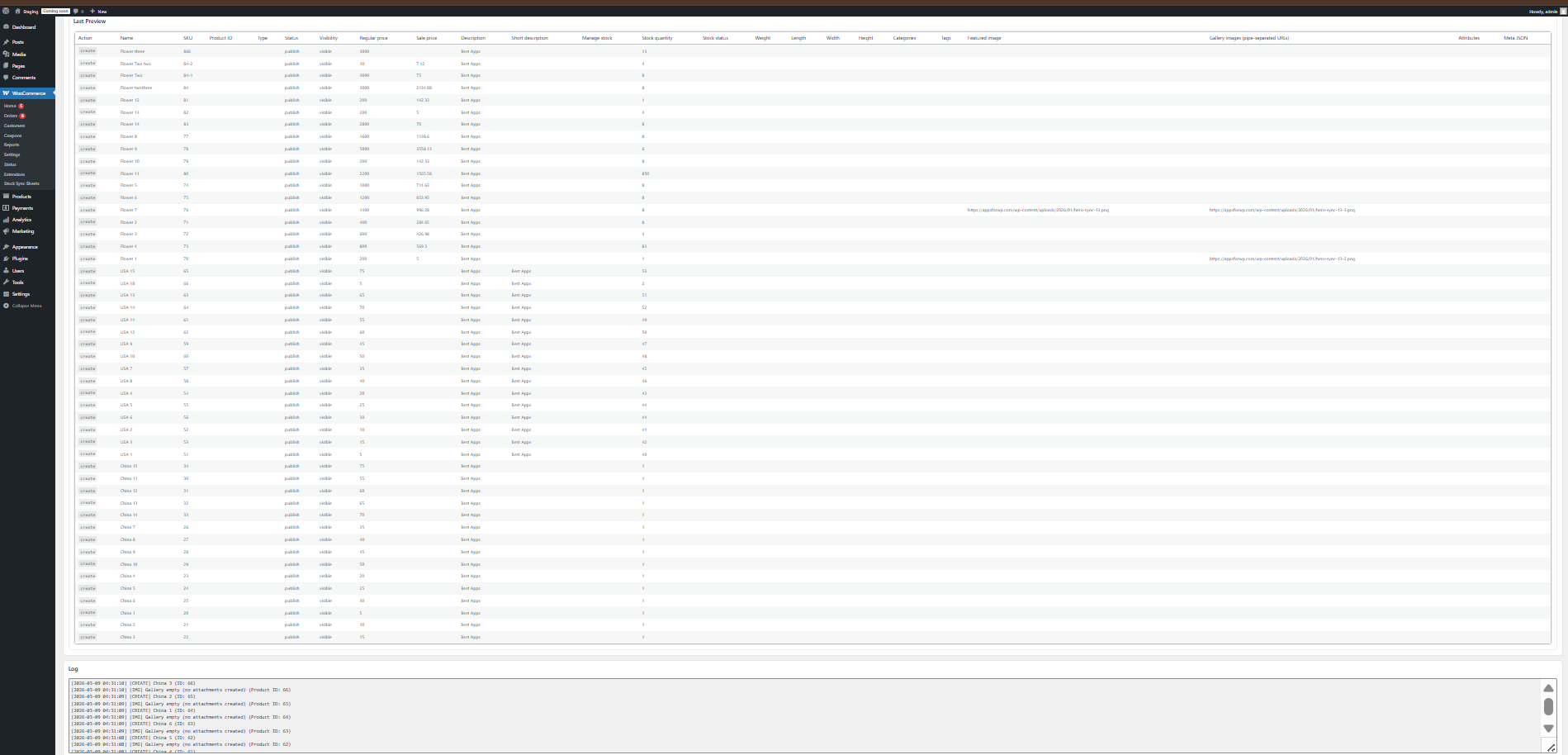
Use Sheet Preview to inspect the rows, mapped fields, product types, SKUs, product IDs, parent fields, categories, tags, attributes, images, and product data before building or updating products.
AI-assisted Preview
Use AI-assisted Preview when you want optional AI drafts for product content and SEO fields. The drafts are staged for AI Review before import.
AI Review
Use AI Review to check generated titles, descriptions, bullet features, SEO titles, meta descriptions, and focus keyphrases before applying approved content.
Live product protection
Preview and review steps help keep product-building workflows controlled instead of pushing unreviewed sheet rows or AI drafts straight into live products.
More than a simple product importer
This is where Product Builder becomes much more valuable. It is not just about importing rows once. It gives your store a cleaner ongoing workflow for creating products, updating products, drafting content, reviewing SEO, and keeping catalog work moving faster.
Reduce repeated manual product entry
Spend less time creating products one by one when the source data already exists in a spreadsheet.
Reduce manual content writing
Use AI drafts to speed up product descriptions, feature bullets, SEO titles, meta descriptions, and focus keyphrase work.
Handle structured catalog data better
Map product fields more clearly so product types, parent fields, categories, tags, attributes, images, and meta data are easier to manage.
Keep larger catalogs more manageable
Make product creation, product updates, AI drafting, and staged content review easier to handle when your store has many products or frequent catalog changes.
Field mapping and build logs make the workflow clearer
Product Builder is designed to stay practical. You can configure field mapping, review what is being built or updated, and use logs to understand what happened.
What Product Builder can handle
This is one of the biggest reasons the feature matters. Product Builder helps with broader WooCommerce catalog workflows, not just simple product creation.
Categories and tags
Use sheet data to support cleaner assignment of product categories and tags as part of your catalog workflow.
Attributes and variation data
Map attribute data, variation attributes, default attributes, and other structured fields from your sheet into WooCommerce more practically.
Images from sheet URLs
Support featured image and gallery image workflows using image URLs stored in your spreadsheet.
Custom, AI, and broader product fields
Use Product Builder as part of a more flexible spreadsheet-driven catalog system that includes mapped product data, optional AI content drafts, and SEO drafts.
How to create WooCommerce products from Google Sheets
The workflow stays practical: configure the sheet, map the fields, preview the data, optionally generate AI drafts, review the output, and then create or update products from the spreadsheet data.
Connect your Google Sheet
Use the sheet that contains the product data you want to create or update in WooCommerce.
Map your product fields
Choose how sheet columns match WooCommerce fields such as SKU, product ID, product type, parent fields, descriptions, stock fields, categories, tags, attributes, images, and meta data.
Run Sheet Preview
Review rows, mapped data, row ranges, product types, and potential issues before creating or updating products.
Use AI-assisted Preview
Generate product titles, descriptions, feature bullets, SEO titles, meta descriptions, and focus keyphrases from mapped sheet data using your own OpenAI API key.
Review before import
Check build results, logs, and AI Review drafts before applying approved content or product updates to WooCommerce.
Who should create WooCommerce products from Google Sheets
Product Builder is especially useful for businesses that already organize product data in spreadsheets and want a cleaner way to move that data into WooCommerce with less manual writing and less repeated admin work.
Stores with growing catalogs
Useful when product setup, product updates, product descriptions, and SEO fields become too time-consuming to manage manually inside WooCommerce.
Spreadsheet-based product workflows
Helpful when your business already maintains product information in Google Sheets and wants to use that data more efficiently.
Merchants using image URLs in sheets
Support product images from sheet URLs as part of a more complete spreadsheet-driven product workflow.
Teams that want AI to save writing time
Built for stores that want help drafting product content and SEO fields instead of writing every product page manually from scratch.
What is included in Stock Sync Sheets
Product Builder, AI Review, and Price Sync are included in the main plugin together with the wider Google Sheets workflow tools used across Stock Sync Sheets.
Product Builder is included
Product Builder is included in Stock Sync Sheets. It is part of the main plugin, not a separate add-on.
AI Review is included
AI Review is part of the Product Builder workflow. AI usage is optional and requires your own OpenAI API key.
Works with the wider workflow
Use Product Builder alongside WooCommerce inventory Google Sheets stock sync, Price Sync, Dashboard, Sheet Editor, Sheet Push, Push on Sale, manual review, confirmed matches, ignored items, and blacklist controls.
Price Sync is included at no extra cost
Product Builder, AI Review, and Price Sync are included in the main Stock Sync Sheets plugin. Use Price Sync for regular price and sale price updates from Google Sheets without buying a separate add-on.
Related guides for WooCommerce products from Google Sheets
These guides explain the Product Builder workflows that connect AI content, AI SEO, variable product creation, and no-code Google Sheets setup.
WooCommerce AI Product Description Generator
Learn how AI can help draft WooCommerce product titles, short descriptions, long descriptions, and feature bullets from mapped sheet data.
WooCommerce AI SEO Product Fields
See how AI-assisted drafts can help prepare SEO titles, meta descriptions, and focus keyphrases for review before import.
Create Variable Products from Google Sheets
Learn how Product Builder can support variable products and variation rows when your Google Sheet is mapped correctly.
WooCommerce Google Sheets REST API Alternative
Compare a no-code Google Sheets Product Builder workflow with building and maintaining a custom WooCommerce REST API integration.
Product Builder FAQs
Can I create WooCommerce products from Google Sheets?
Yes. Product Builder helps you create WooCommerce products from Google Sheets and update existing products using mapped sheet fields, Sheet Preview, AI-assisted preview, and review-first catalog workflows.
How does AI save time in Product Builder?
AI can help draft product titles, short descriptions, long descriptions, bullet features, SEO titles, meta descriptions, and focus keyphrases from mapped sheet data. That means you can review and edit drafts instead of writing every product page from scratch.
Does AI automatically overwrite live WooCommerce products?
No. AI drafts are staged for review first. You can inspect the generated content and SEO drafts before importing approved content into WooCommerce.
Can Product Builder update existing WooCommerce products?
Yes. Product Builder can update existing WooCommerce products from Google Sheets, not just create new ones. The exact result depends on the mapped fields and sheet structure used.
What product types can Product Builder work with?
Product Builder supports mapped workflows for simple products, variable products, variation rows, grouped products, external or affiliate products, virtual products, and downloadable products.
Can I map fields from sheet columns?
Yes. You can map fields from your Google Sheet columns to the WooCommerce fields you want to create or update.
Can Product Builder handle categories, tags, attributes, and images?
Yes. Product Builder is designed for broader product workflows including mapped fields such as categories, tags, attributes, variation attributes, default attributes, grouped children, featured images, gallery images, and meta data.
What is the difference between Sheet Preview and AI-assisted Preview?
Sheet Preview helps you inspect mapped sheet rows before product creation or updates. AI-assisted Preview helps generate staged product content and SEO drafts for AI Review before approved content is imported.
Does Stock Sync Sheets sell AI credits?
No. Customers use their own OpenAI API key. Stock Sync Sheets does not sell AI credits, does not add usage markup, and does not take commission from AI usage.
Is Product Builder included in the core plugin?
Yes. Product Builder and AI Review are included in the main Stock Sync Sheets plugin.
Create WooCommerce products from Google Sheets without writing every product by hand
Use Product Builder from Google Sheets to create products faster, update existing products more cleanly, generate AI-assisted content and SEO drafts, and review everything before importing approved changes into WooCommerce.
Buy Now