WooCommerce Sheet Push to Google Sheets
Push stock changes and sales to Google Sheets in real time
WooCommerce Sheet Push sends stock changes and sales back to Google Sheets in real time, helping your shared inventory sheet stay current without repeated manual updates.
Use Full Export, Incremental Push, or Push on Sale to move WooCommerce stock data in the store-to-sheet direction. This page is focused on live inventory updates, not a basic WooCommerce order export.
Three ways WooCommerce Sheet Push updates Google Sheets
- ✔Full Export — push a wider set of WooCommerce stock data to Google Sheets
- ✔Incremental Push — send changed WooCommerce stock data back to Google Sheets
- ✔Push on Sale — update Google Sheets in real time when WooCommerce sales reduce stock
- ✔Support shared inventory workflows across one or multiple WooCommerce stores

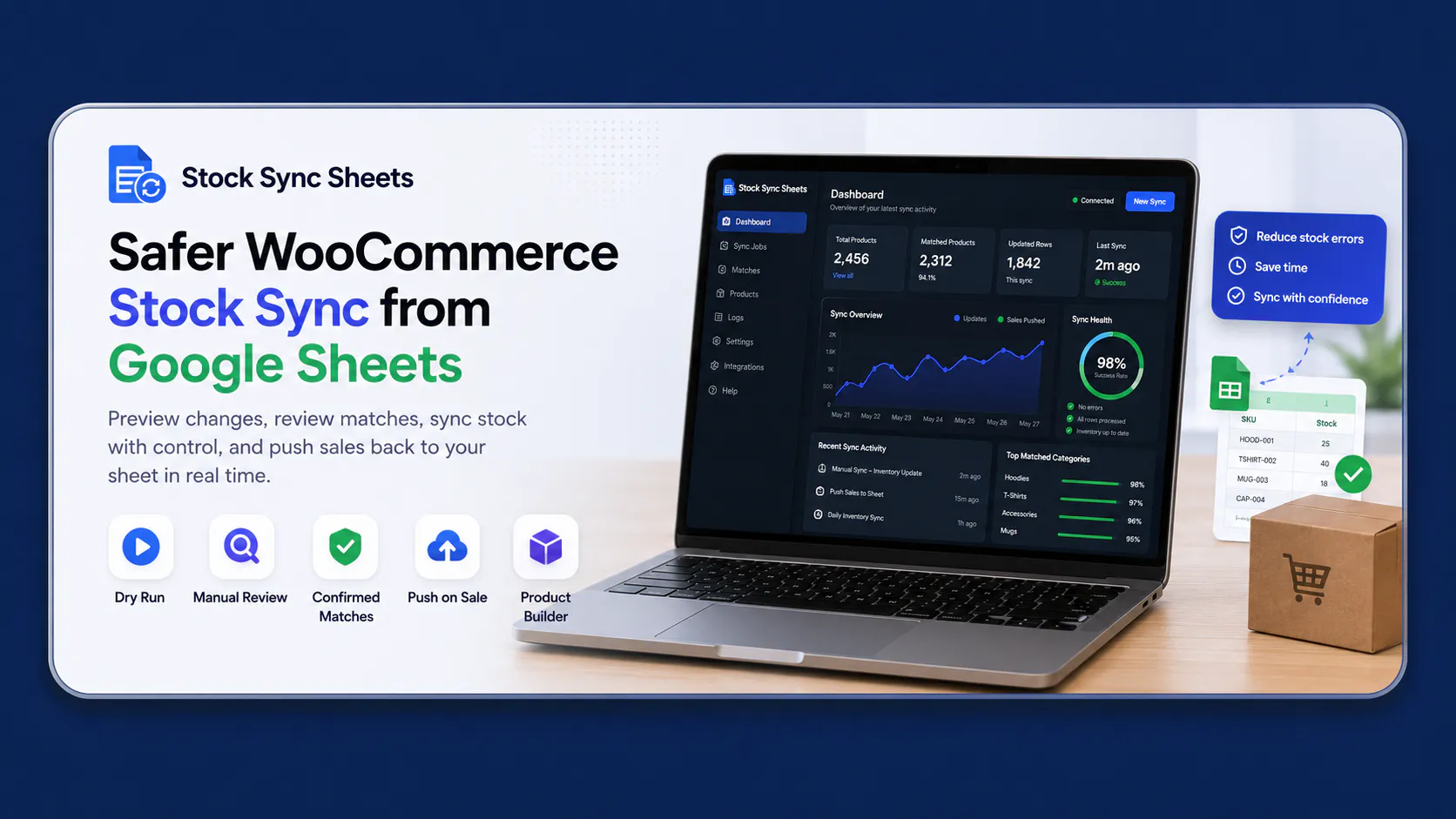
WooCommerce Sheet Push for live stock workflows
Most integrations focus on pulling data from Google Sheets into WooCommerce. WooCommerce Sheet Push handles the return direction by sending stock changes and sale reductions from WooCommerce back to Google Sheets.
It is the store-to-sheet branch of the full WooCommerce Google Sheets integration workflow, built to keep shared inventory data closer to current store activity.
Need your sheet updated after every sale?
Read the Push WooCommerce Sales Back to Google Sheets guide for the focused sale-to-sheet workflow. It explains how Push on Sale sends stock reductions back to Google Sheets in real time after WooCommerce sales.
Need a no-code alternative to custom REST API work?
Read the WooCommerce Google Sheets REST API Alternative guide if you want a spreadsheet workflow without building and maintaining your own custom REST API integration.
Looking for stock sync from Google Sheets?
Sheet Push covers store-to-sheet updates. For the main Google-Sheets-to-WooCommerce stock workflow, use the WooCommerce inventory Google Sheets page.
Three WooCommerce Sheet Push workflows
Choose the method that matches your inventory process: refresh a wider stock set, push only changed data, or update Google Sheets immediately after a WooCommerce sale reduces stock.
Full export
Push a wider set of WooCommerce stock data to Google Sheets when you need a refreshed sheet-side view of your current WooCommerce inventory workflow.
Incremental push
Send changed WooCommerce stock data back to Google Sheets without needing to rebuild the whole sheet every time.
Push on Sale
Update the Google Sheet in real time when WooCommerce sales reduce stock, helping your shared sheet reflect sale changes faster.
Shared stock hub
Use Google Sheets as a shared stock source so other stores, teams, or workflows can pull fresher stock values on their next sync.
Why WooCommerce Sheet Push matters for shared stock
If more than one WooCommerce store uses the same Google Sheet as a stock source, Push on Sale helps the shared sheet reflect sales faster. Other stores can then pull fresher stock values on their scheduled sync.
Without a push workflow
Stock can change inside WooCommerce after an order. However, the shared Google Sheet may still show the old value until someone manually edits it or runs another process.
- !Manual spreadsheet edits become necessary
- !Other stores may pull stale stock values
- !Teams may not know which stock number is current
- !Multi-store stock workflows become harder to trust
With real-time Sheet Push and Push on Sale
WooCommerce stock and sale changes can be sent back to the shared sheet in real time, helping the sheet stay closer to real store activity.
- ✔Sales can update the sheet in real time
- ✔Incremental changes can be pushed back
- ✔Full exports can refresh wider stock data
- ✔Other stores can pull fresher values on schedule
Why store owners push stock back to Google Sheets
When stock changes happen in WooCommerce but the shared sheet is not updated quickly, teams start working from stale information. This push workflow sends WooCommerce stock and sale changes back to Google Sheets so the sheet stays useful as an operational stock source.
If your main workflow starts from the spreadsheet side, see Google Sheets to WooCommerce stock sync.
Push stock changes back to Google Sheets
Send WooCommerce stock movement back to your Google Sheet so the shared stock source stays closer to real store activity.
Push on Sale updates Google Sheets in real time
When a sale changes stock in WooCommerce, Push on Sale can update your Google Sheet in real time instead of relying on manual processes or delayed spreadsheet edits.
Support multi-store workflows
Useful when one Google Sheet is part of a shared inventory workflow across one or multiple WooCommerce stores.
Work with scheduled syncs
Because the sheet updates faster, scheduled syncs on other stores can pull fresher stock data and stay better aligned.
See WooCommerce Sheet Push in action
This is where merchants manage the store-to-sheet push workflow and keep Google Sheets closer to real WooCommerce stock activity.

Watch the Sheet Push videos
These walkthroughs show how Push By Sale works and how Sheet Push can create a full Google Sheet from WooCommerce product and stock data.
Stock Sync Sheets For WooCommerce Push By Sale
Understand how Push By Sale updates Google Sheets in real time when WooCommerce sales reduce product stock.
Stock Sync Sheets For WooCommerce Sheet Push Creating Sheets
See how Sheet Push can create a full Google Sheet from WooCommerce product and stock data.
Better than a basic import-only workflow
This is one of the biggest reasons Sheet Push stands out. A basic importer mostly pulls data in. Sheet Push sends WooCommerce stock and sale changes back out to Google Sheets, making the sheet more useful as part of the live operational workflow.
Reduce delayed stock visibility
Reduce the gap between WooCommerce stock changes and what your Google Sheet shows the team.
Reduce repeated manual sheet edits
Spend less time correcting stock in spreadsheets after sales, adjustments, and day-to-day store activity.
Reduce confusion about which numbers are right
Make the shared sheet more reliable as an operational source instead of forcing staff to compare systems manually.
Reduce disconnected multi-store processes
Help shared inventory workflows stay more practical when several stores depend on the same stock source.
Full export support for larger workflows
This feature is not only about sale-triggered real-time updates. It also supports broader stock export workflows when you need wider WooCommerce stock data pushed back out to your sheet.
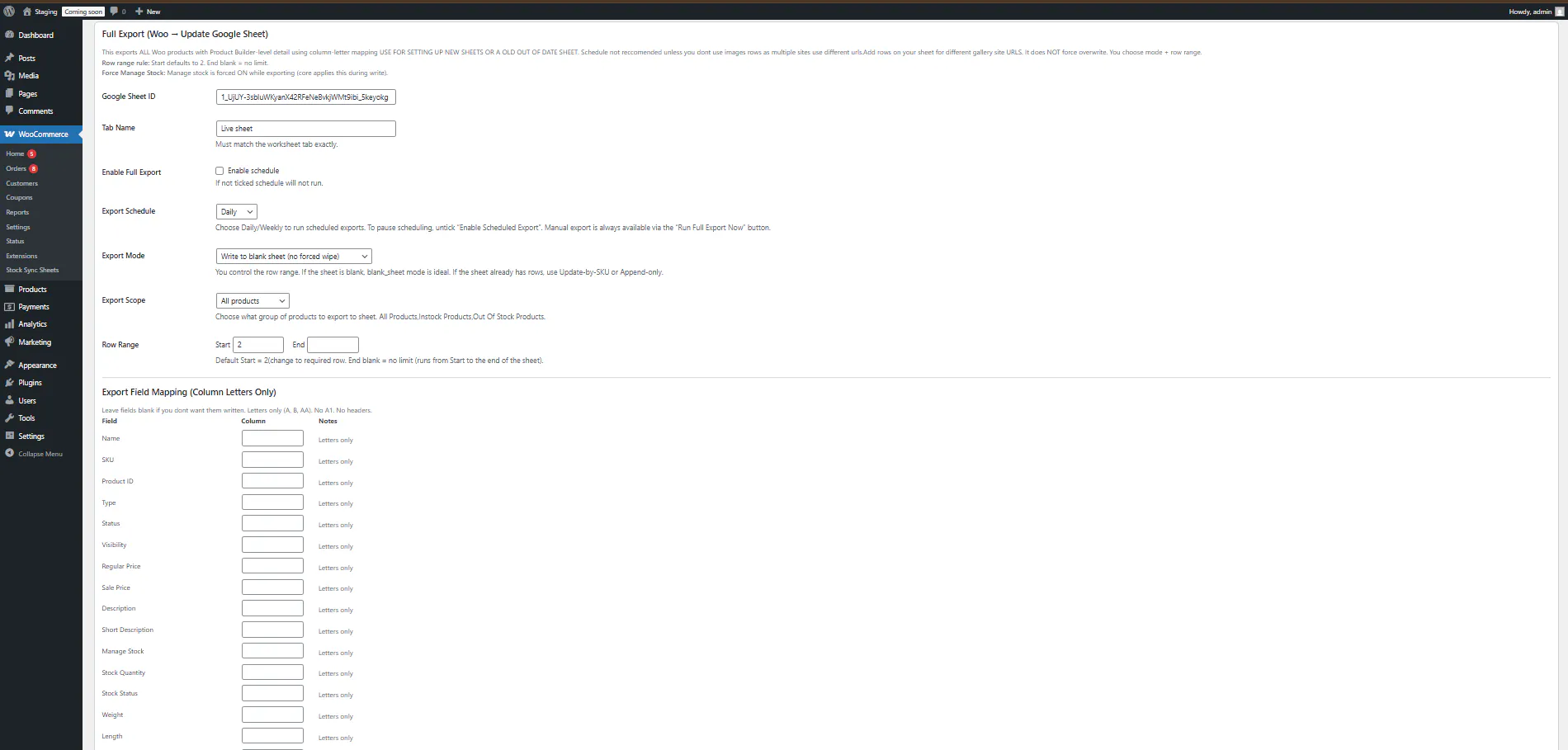
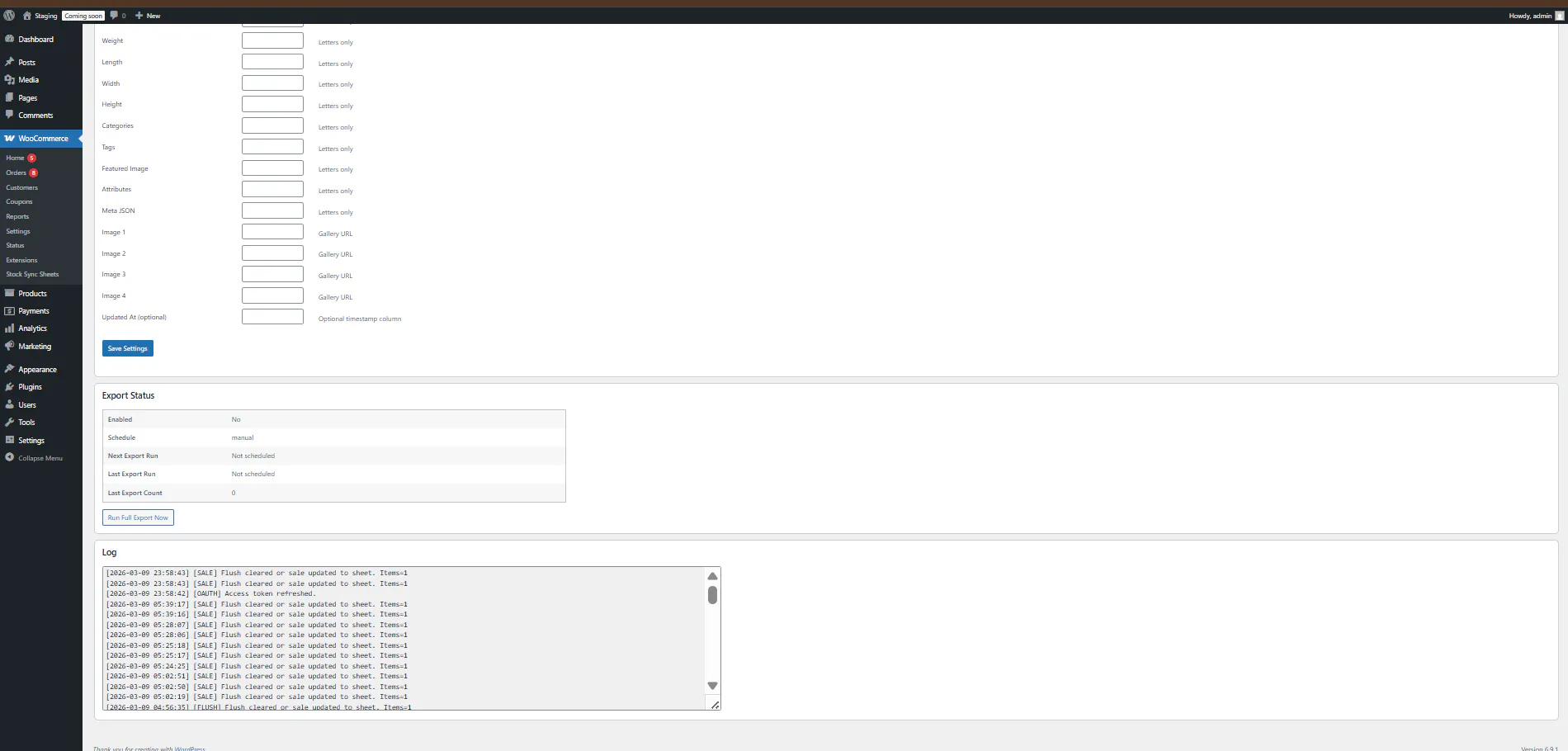
WooCommerce Sheet Push workflow options
Sheet Push gives your store more than one way to send WooCommerce stock and sale changes back to Google Sheets. It is easier to choose the right workflow for your store size, update frequency, and shared stock setup.
| Workflow | What it does | Best used for |
|---|---|---|
| Full Export | Pushes a wider set of WooCommerce stock data back to Google Sheets. | Refreshing the sheet with a broader WooCommerce stock view. |
| Incremental Push | Sends changed WooCommerce stock data back to your configured Google Sheet workflow. | Keeping the sheet updated without rebuilding everything each time. |
| Push on Sale | Updates the Google Sheet in real time when WooCommerce sales reduce stock. | Helping the shared sheet reflect sale-triggered stock reductions in real time. |
| Scheduled pull sync | Other stores or workflows can pull values from the updated sheet on schedule. | Multi-store or shared inventory workflows using one sheet as a stock hub. |
| Sync logs | Shows push/export activity so you can track what happened. | Troubleshooting and confirming that store-to-sheet updates ran correctly. |
How this push workflow works
The workflow stays practical: WooCommerce stock changes happen, the shared sheet updates in real time after sales, and other stores or teams can work from more current numbers.
Connect your Google Sheet workflow
Use Google Sheets as part of your shared inventory process inside the wider Stock Sync Sheets setup.
Choose the push method
Use Full Export, Incremental Push, or Push on Sale depending on whether you need a wider export, changed stock updates, or sale-triggered sheet updates.
WooCommerce stock changes happen
Sales or stock adjustments change inventory inside WooCommerce as the store runs normally.
Google Sheets updates in real time after sales
The shared sheet reflects sale-related stock reductions in real time, helping teams and other stores work from fresher stock data.
Other stores can pull fresher values
If multiple stores use the same sheet, their scheduled syncs can pull newer stock values from the shared source.
Who this feature is built for
This feature is especially useful for merchants who rely on Google Sheets as a working inventory source, not just a report.
Multi-store WooCommerce businesses
Useful when several stores need one shared stock workflow to stay more aligned.
Shared warehouse or supplier workflows
Helpful when staff, warehouses, or suppliers use one Google Sheet as a central stock reference.
Teams already using spreadsheets daily
Good for businesses that already depend on Google Sheets as part of their normal inventory process.
Merchants wanting a practical system
Built for stores that want something easier to understand than heavy inventory software and disconnected manual steps.
What is included in Stock Sync Sheets
Sheet Push, Push on Sale, and Price Sync are included in the main plugin at no extra cost. As a result, Stock Sync Sheets is broader than a basic stock sync tool.
Included in the core plugin
Sheet Push, Full Export, Incremental Push, and real-time Push on Sale are included in Stock Sync Sheets, not sold as a separate add-on.
Works with the wider stock workflow
Use Stock Sync to pull inventory in and Sheet Push to send WooCommerce stock and sale changes back out to Google Sheets for a stronger shared-sheet workflow.
Visible from the Dashboard
The main Dashboard can help users check Sheet Push and Push on Sale workflow status alongside Stock Sync, Price Sync, Product Builder, and AI Review.
Price Sync included at no extra cost
Price Sync is built into Stock Sync Sheets for stores that want regular price and sale price updates from Google Sheets. No additional purchase is required.
Simple pricing
Buy through WooCommerce.com with updates, support, and a 30-day refund policy. Sheet Push, Full Export, Incremental Push, real-time Push on Sale, and Price Sync are included in the main Stock Sync Sheets plugin at no extra cost.
1-Year License
Get 12 months of updates and support, plus a 30-day money-back guarantee.
Buy on WooCommerce.com2-Year License
Save more over a longer term and keep your store covered for longer with updates and support.
Buy on WooCommerce.comSheet Push FAQs
What is WooCommerce Sheet Push?
WooCommerce Sheet Push sends stock changes and sales back to Google Sheets so your shared inventory source stays more current. It supports Full Export, Incremental Push, and real-time Push on Sale workflows.
What is Full Export?
Full Export pushes a wider set of WooCommerce stock data back to Google Sheets when you need a refreshed sheet-side view of your WooCommerce stock workflow.
What is Incremental Push?
Incremental Push sends changed stock data back to your Google Sheet workflow without needing to rebuild the whole sheet every time.
What is Push on Sale?
Push on Sale updates your Google Sheet in real time after sales happen in WooCommerce so shared stock workflows can react faster. For the focused explanation, read the Push WooCommerce Sales Back to Google Sheets guide.
Is Sheet Push included in the core plugin?
Yes. Sheet Push, Full Export, Incremental Push, and Push on Sale are included in the main Stock Sync Sheets plugin.
Can this help with multi-store workflows?
Yes. It supports shared inventory workflows where one Google Sheet helps keep multiple WooCommerce stores better aligned.
Why is this better than a basic import-only tool?
Basic import-only tools mainly pull data in. Sheet Push helps your WooCommerce store send stock and sale changes back out to Google Sheets, reducing lag and repeated manual spreadsheet updates.
Does this work with scheduled syncs?
Yes. Real-time updates to the shared sheet after WooCommerce sales help other scheduled sync workflows pull fresher data and stay more consistent.
Does Sheet Push guarantee every store is perfectly in sync instantly?
No. The honest workflow is that Sheet Push and Push on Sale update Google Sheets in real time after WooCommerce sales, while other stores can then pull fresher values on their scheduled syncs.
Use WooCommerce Sheet Push to keep Google Sheets current
Send stock changes and sales back to Google Sheets with Full Export, Incremental Push, and real-time Push on Sale. Reduce manual sheet work and support cleaner shared inventory workflows across one store or multiple stores.
Buy Now