⚡ Safer WooCommerce inventory Google Sheets sync
WooCommerce Inventory Google Sheets Sync
WooCommerce inventory Google Sheets stock sync gives stores a safer way to update live product quantities from a spreadsheet. Preview every change with Dry Run, send uncertain matches to Manual Review, save confirmed matches, schedule trusted updates and keep your sheet current after sales with real-time Sheet Push.
- Preview WooCommerce stock changes with Dry Run before applying them.
- Prevent overselling caused by outdated or incorrect spreadsheet quantities.
- Send uncertain product matches to Manual Review instead of guessing.
- Save confirmed matches so repeat supplier and warehouse stock syncs are faster.
- Push WooCommerce sale stock reductions back to Google Sheets in real time.

Built for shared, supplier and warehouse inventory spreadsheets where accurate matching and update review matter.
How WooCommerce inventory Google Sheets sync works
Stock Sync Sheets turns your Google Sheet into a controlled WooCommerce inventory feed. Review product matches, preview bulk stock updates and apply only the changes you trust instead of relying on risky one-click imports.
Connect your inventory sheet
Use a Google Sheet as the source for stock quantities, stock status, SKUs and product names. The same controlled workflow can support supplier inventory, warehouse stock sheets or a shared inventory spreadsheet while WooCommerce remains the live store catalog.
Preview with Dry Run
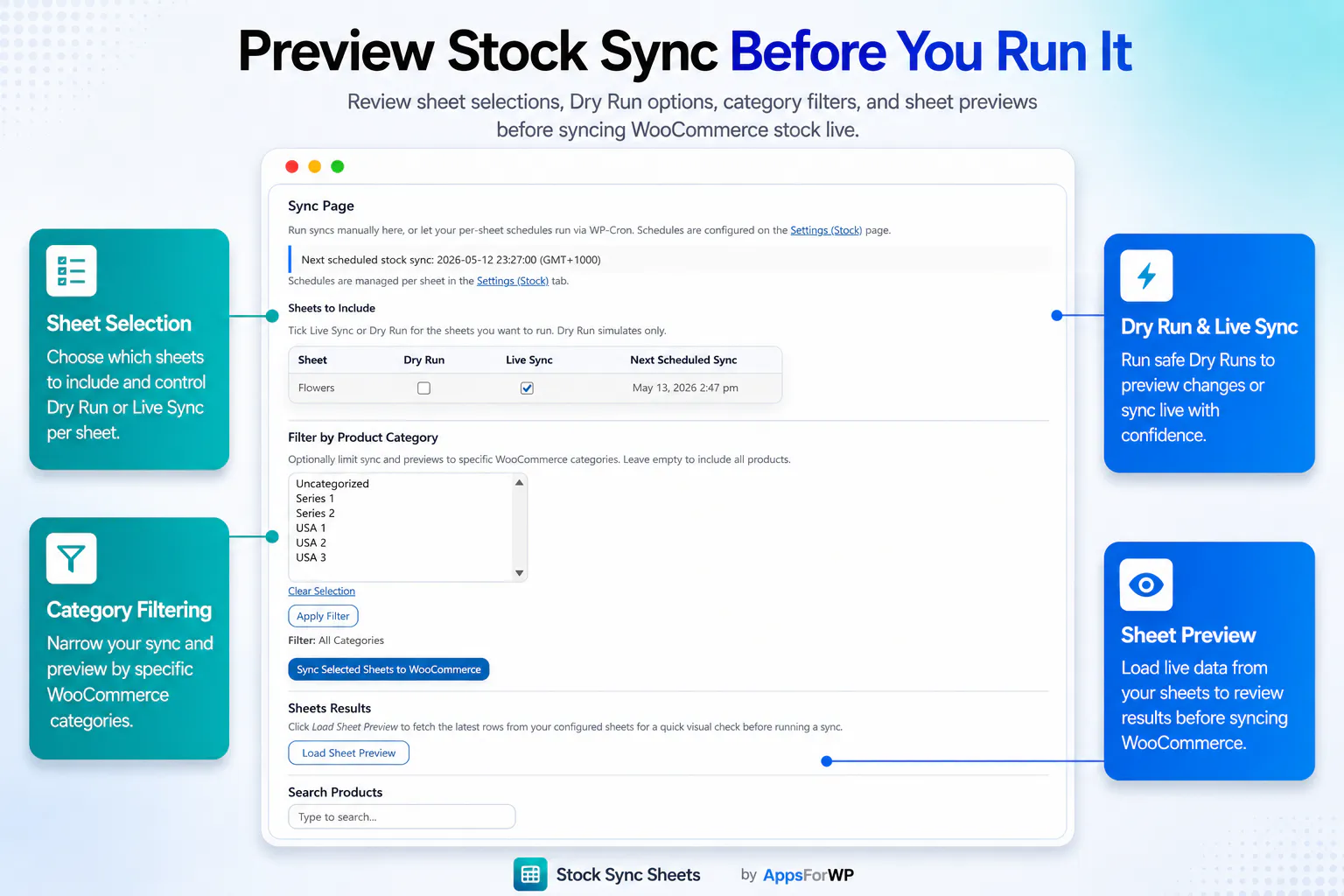
Dry Run lets you preview proposed stock changes before they update live products. This creates a WooCommerce inventory review before sync, giving you a safer checkpoint before a bulk stock update goes live.
Review uncertain matches
Manual Review stops uncertain product matches from being applied automatically. Stock Sync Sheets confirmed matches are saved for reuse, making future Google Sheets inventory updates more repeatable and easier to trust.
Review WooCommerce inventory before every Google Sheets update
A WooCommerce bulk stock update from Google Sheets can affect hundreds of products at once. Stock Sync Sheets adds matching checks, a Dry Run preview and Manual Review so you can verify the proposed quantities before live inventory changes.
- Use Dry Run to see every product and quantity Stock Sync Sheets plans to update.
- Check matched products before running live WooCommerce inventory changes.
- Hold uncertain matches for Manual Review instead of applying them blindly.
- Reuse confirmed matches across supplier inventory, warehouse stock and shared inventory sheets.
- Run manual updates for direct control, then schedule the workflow after it has been verified.
Best for WooCommerce stock spreadsheet workflows
- You manage WooCommerce inventory counts in Google Sheets.
- You receive supplier inventory or warehouse stock updates in spreadsheets.
- You use a shared inventory sheet across staff, locations or systems.
- You want to prevent overselling by reviewing stock changes before they run.
Related Stock Sync Sheets workflows
- Use Sheet Push when WooCommerce sales should update your Google Sheet in real time.
- Use Product Builder when you need to create or update product data from a spreadsheet.
- Use the included Price Sync module for controlled regular and sale price updates at no extra cost.
- Use the homepage when you want the complete Stock Sync Sheets product overview.
Prevent overselling and costly WooCommerce stock errors
A WooCommerce inventory Google Sheets workflow should not mean uploading a spreadsheet and hoping every row matches correctly. Stock Sync Sheets keeps the strongest safeguards visible: Dry Run before live changes, Manual Review for uncertain matches, reusable confirmed matches and real-time Sheet Push when WooCommerce sale stock reductions must update the spreadsheet.
WooCommerce inventory sync features that protect live stock
The WooCommerce inventory Google Sheets workflow is built around the points where spreadsheet updates can go wrong: incorrect quantities, uncertain product matches, outdated supplier data and sales that are not reflected in the sheet.
Dry Run stock preview
Preview proposed product matches and stock quantities before they affect live WooCommerce products. This is the safer first step for every Google Sheets inventory update.
Manual Review and confirmed matches
When product matching is uncertain, Manual Review gives you a place to check the result. Once approved, confirmed matches can be reused during future stock syncs.
Real-time sales stock reduction
When WooCommerce sales reduce stock, Sheet Push can send the updated quantity back to Google Sheets so the spreadsheet does not continue showing inventory that has already sold.
WooCommerce inventory Google Sheets questions
These answers cover the most common stock spreadsheet, supplier inventory, review and real-time update workflows.
Can I manage WooCommerce inventory in Google Sheets?
Yes. Stock Sync Sheets uses your spreadsheet as the source for WooCommerce stock quantities and stock status updates while adding Dry Run, Manual Review and confirmed matches before live changes are applied.
Can supplier or warehouse stock sheets update WooCommerce?
Yes. You can use supplier inventory, warehouse stock or shared inventory Google Sheets as the source, provided the sheet contains the product identifiers and stock columns required by your configured workflow.
How does Stock Sync Sheets help prevent overselling?
Dry Run helps catch incorrect quantities before they go live, while Sheet Push can send WooCommerce sale stock reductions back to Google Sheets. Together, these controls reduce the risk of selling stock that the spreadsheet still shows as available.
Can WooCommerce sales update Google Sheets in real time?
Yes. Use Sheet Push when WooCommerce sale stock reductions need to update Google Sheets after an order reduces inventory, keeping the spreadsheet closer to the live store quantity.
Can I review inventory before the sync runs?
Yes. Dry Run provides a WooCommerce inventory review before sync, and Manual Review holds uncertain matches until you decide whether they should be confirmed or ignored.
Where should I go if I want setup help?
Start with the Stock Sync Sheets setup guides, then use the support page if you need help with license activation, sync setup, matching problems or troubleshooting.