
WooCommerce Price Sync from Google Sheets — Safer Regular and Sale Price Updates
WooCommerce price sync from Google Sheets now comes with Stock Sync Sheets, helping you update regular prices and sale prices through mapped columns, confirmed product matches, Dry Run checks, and logs.
As a result, you can manage pricing in the spreadsheet where your product data already lives, then push those price changes into WooCommerce without opening every product one by one.
Stock Sync Sheets includes Price Sync at no additional cost. Therefore, you do not need a second purchase or another plugin. In addition, Stock Sync and Price Sync use dedicated workflows inside the same plugin, so you can configure, review, and log quantity changes and pricing changes independently.
Moreover, Price Sync supports the wider WooCommerce Google Sheets integration workflow for stores that manage stock, prices, product data, and sheet updates from Google Sheets.
What the included Price Sync module handles
- ✔Sync WooCommerce regular prices from Google Sheets
- ✔Sync WooCommerce sale prices from Google Sheets
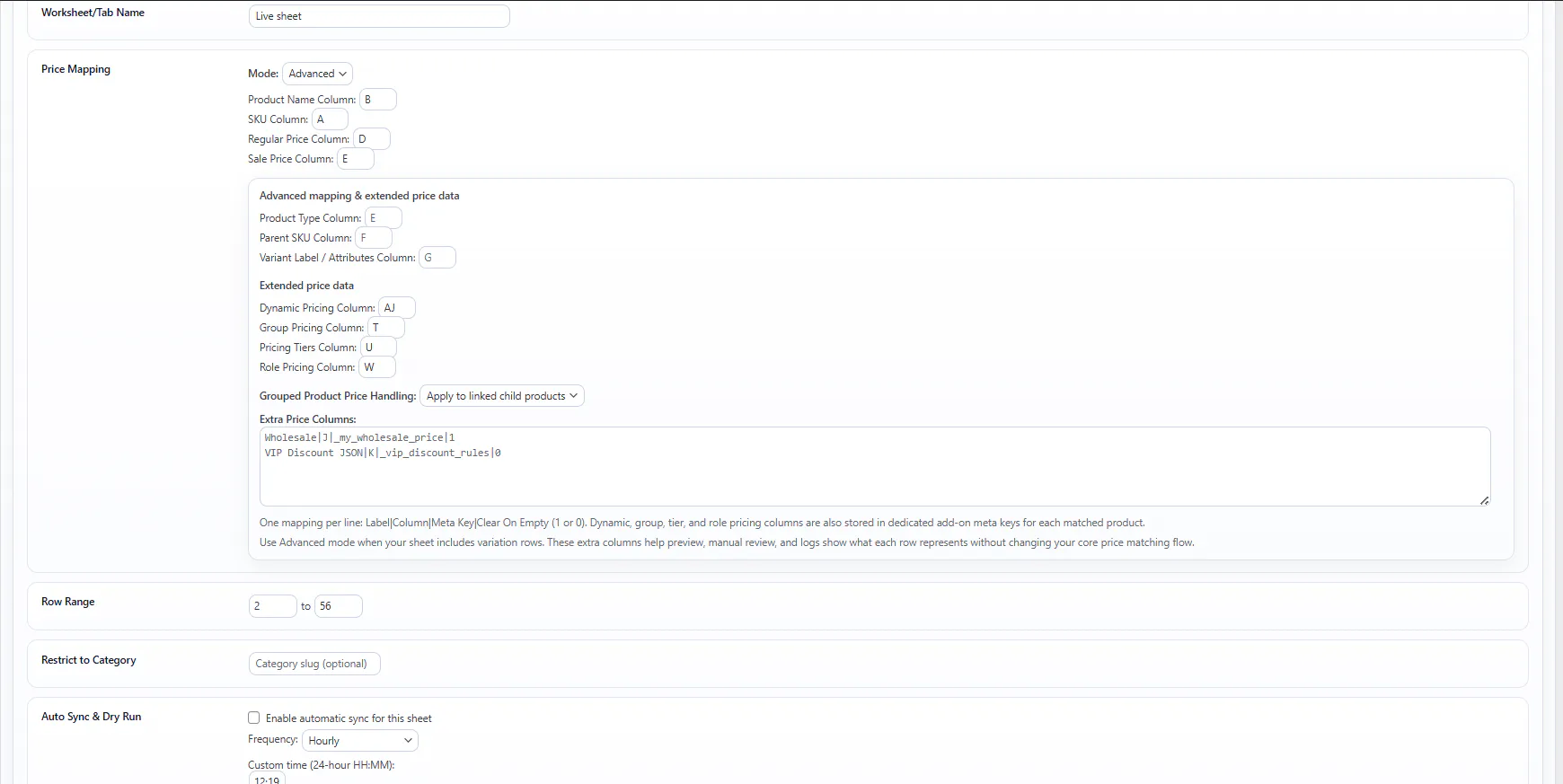
- ✔Map spreadsheet price columns to WooCommerce price fields
- ✔Use confirmed product matches before price updates
- ✔Check pricing changes with Dry Run and logs
- ✔Reduce repeated manual WooCommerce price edits
Stock Sync Sheets Includes WooCommerce Price Sync From Google Sheets
As a result, stores can manage regular prices and sale prices in Google Sheets and send those pricing changes to WooCommerce without repetitive product-by-product editing.
Clear availability note
You can use Price Sync now inside the main Stock Sync Sheets plugin. First, update to the current version. Next, configure the Price Sync module and map the regular price and sale price columns. Then, run Dry Run and review the results. Finally, apply live or scheduled price updates. You do not need a separate purchase or second plugin.
WooCommerce Regular Price and Sale Price Sync
In addition, update WooCommerce regular prices and sale prices from Google Sheets while confirmed product matches, Dry Run checks, review controls, and logs protect every pricing change.
Confirmed Matches Protect Every Price Update
Because a wrong price can affect sales, margins, customer trust, and support work, price updates need stronger control than basic text changes.
Confirmed matches are the safety layer
Therefore, the included Price Sync workflow uses confirmed product matches to link regular price and sale price updates to the correct WooCommerce products before you change live prices.
WooCommerce Price Management from Google Sheets
Instead of editing products one by one, manage WooCommerce prices from Google Sheets. In addition, the included module supports regular price updates, sale price updates, price mapping, confirmed matches, and safer bulk pricing workflows.
Sync regular prices from Google Sheets
For example, update WooCommerce regular prices from your spreadsheet instead of changing them manually inside each product.
Sync sale prices from Google Sheets
Likewise, use spreadsheet sale price columns to manage promotions and sale pricing more consistently across WooCommerce products.
Use confirmed product matches
Therefore, use confirmed matches to keep pricing updates linked to the correct WooCommerce products before you trust live price changes.
Map price fields from sheet columns
Then, connect the right Google Sheet columns to the WooCommerce regular price and sale price fields you want to update.
Price Sync Dashboard visibility
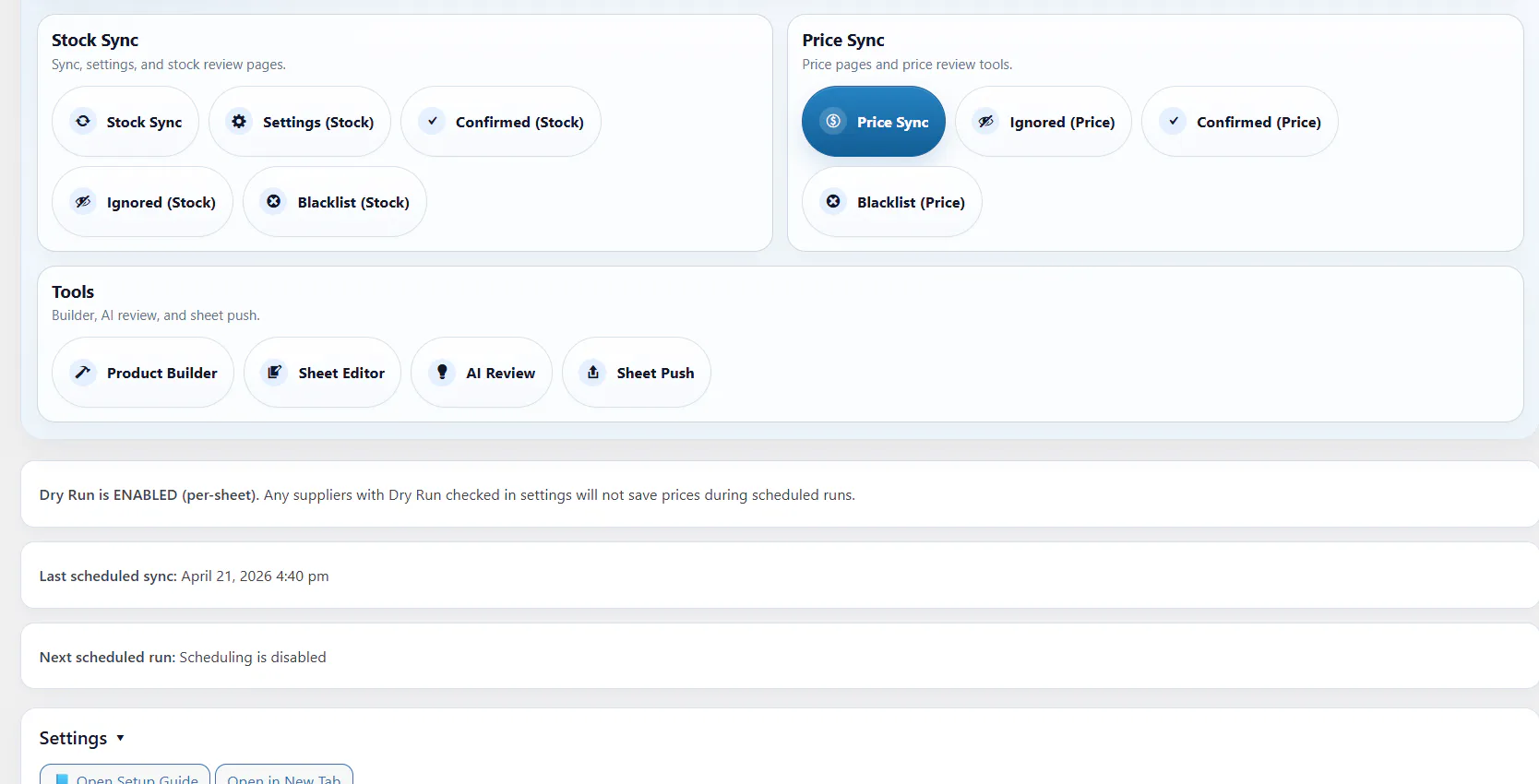
In addition, the main Stock Sync Sheets Dashboard shows Price Sync workflow information alongside the plugin’s stock, product, AI, and Sheet Push tools.
Price Sync status in context
The Dashboard keeps the Price Sync workflow visible alongside the main stock and product workflows.
For example, that visibility matters when a store uses stock sync, Product Builder, AI Review, Sheet Push, Push on Sale, and Price Sync together.
Also, if your Google Sheet controls product creation or product updates, see Product Builder for WooCommerce products from Google Sheets.
What the Dashboard shows
- ✔Price Sync status
- ✔Pending price manual matches
- ✔Confirmed price matches
- ✔Ignored price items
- ✔Price blacklist counts
- ✔Latest price sync status
- ✔Quick access to the pricing workflow page
Preview the included Price Sync workflow
Specifically, this workflow helps merchants sync WooCommerce regular prices and sale prices directly from Google Sheets.
Watch the Price Sync preview video
This video shows the Price Sync workflow for regular price and sale price syncing from Google Sheets.
Stock Sync Sheets For WooCommerce Price Sync
For example, see how the included Price Sync workflow handles regular and sale price syncing from Google Sheets.
Test before live price updates
Treat price updates carefully. Therefore, Price Sync uses Dry Run and logs so you can check regular price and sale price mappings before you apply live changes.
Before live price updates
- ✔Confirm that you connected the correct Google Sheet
- ✔Confirm that you mapped the regular price and sale price columns correctly
- ✔Approve the correct product matches
- ✔Run Dry Run checks before live updates
- ✔Check logs before relying on repeated price syncing
Why this matters
A bad stock update is a problem. A bad price update can be worse because customers may see it immediately, place orders at the wrong price, or trigger support issues.
Instead, map carefully, confirm matches, check logs, test with Dry Run, and then use live price syncing once you trust the setup.
Bulk WooCommerce Price Updates from Google Sheets
As your catalog grows, manual price editing becomes slower. Instead, bulk update WooCommerce regular prices and sale prices from Google Sheets without opening every product. Consequently, confirmed matches, mapped fields, Dry Run checks, and logs make larger pricing changes easier to control.
Repeated manual WooCommerce price edits
As a result, you spend less time opening products one by one just to update regular prices or sale prices.
Re-entering sheet data by hand
Instead, use your spreadsheet as a working pricing source rather than duplicating the same updates inside WooCommerce.
Messy price field management
For example, map the correct price columns from your sheet so updates are easier to understand and maintain.
Slow pricing updates on larger catalogs
As a result, price changes become easier to manage when your store has many products or frequent pricing adjustments.
Settings and logs keep pricing updates clearer
In addition, the included module provides practical controls for configuring price settings, reviewing logs, and following regular price and sale price updates.

How the included Price Sync module works
The workflow is simple. First, connect the sheet. Next, map the price fields and confirm product matches. Then, test the setup. Finally, sync regular prices and sale prices from Google Sheets to WooCommerce.
Connect your Google Sheet
First, use the sheet that contains the regular price and sale price data you want to sync to WooCommerce.
Map your price fields
Next, choose which columns in your sheet match the WooCommerce regular price and sale price fields you want to update.
Work from confirmed product matches
Then, use confirmed product matches to link pricing updates to the right WooCommerce products.
Test with Dry Run and logs
Afterward, check mapped values, product matches, skipped rows, warnings, and price update output before relying on live updates.
Sync prices from the sheet
Finally, run the pricing workflow to update regular prices and sale prices from your spreadsheet data.
Price Sync workflow controls
Stock Sync Sheets includes Price Sync as a price-specific workflow. However, it remains separate from stock quantity syncing, so you can configure, review, schedule, and log pricing changes independently.
| Workflow area | What it does | Why it matters |
|---|---|---|
| Regular price sync | Update WooCommerce regular prices from mapped Google Sheet columns. | Keeps standard product pricing easier to manage from your spreadsheet. |
| Sale price sync | Update WooCommerce sale prices from mapped Google Sheet columns. | Helps manage promotions and sale pricing without editing products one by one. |
| Confirmed matches | Use approved product matches before you trust pricing updates. | Reduces the risk of price changes going to the wrong WooCommerce product. |
| Dry Run and logs | Help check mapped values and update results before relying on live price updates. | Gives store owners a safer testing path before price changes affect live products. |
| Dashboard status | Show Price Sync status inside the main Stock Sync Sheets workflow. | Keeps Price Sync visible alongside the main stock, product, AI, and push workflows. |
Who WooCommerce Price Sync Helps
Specifically, the included Price Sync module serves stores that already manage pricing in spreadsheets and want a cleaner way to move those price changes into WooCommerce.
Stores with frequent pricing updates
For example, it helps when regular price changes or sale price changes happen often and manual editing becomes too slow.
Spreadsheet-based pricing workflows
Likewise, it helps when your business already manages price data in Google Sheets and wants to use that data more efficiently.
Merchants wanting a practical workflow
In particular, it gives businesses a straightforward way to manage WooCommerce prices from a spreadsheet.
Larger WooCommerce catalogs
Likewise, it helps when pricing changes across many products become too repetitive to manage one by one.
Included with Stock Sync Sheets at no extra cost
Stock Sync Sheets includes Price Sync in the main plugin. Therefore, you get a controlled workflow for regular price and sale price updates without a second purchase, additional plugin, or extra licence fee.
Works inside the main plugin
In addition, the current Stock Sync Sheets plugin includes Price Sync without requiring another purchase or installation.
Supports the wider workflow
Moreover, Price Sync works alongside the main Stock Sync Sheets workflow when stores need spreadsheet-based regular price and sale price updates.
Handles pricing-focused updates
Specifically, this module handles regular price and sale price syncing from Google Sheets to WooCommerce.
Dashboard visibility
As a result, Price Sync appears in the main Stock Sync Sheets workflow, making pricing status and controls easier to find.
Related Price Sync setup guides
For more detail, use these guides to understand the wider Price Sync workflow, including setup documentation, regular price syncing, and sale price syncing from Google Sheets.
Stock Sync Sheets Guide Hub
First, open the main guide hub for setup help, videos, PDF guides, Stock Sync, Sheet Push, Product Builder, AI Review, and Price Sync documentation.
WooCommerce Sale Price Sync from Google Sheets
Next, learn how to sync WooCommerce sale prices when you manage promotion pricing in Google Sheets.
WooCommerce Regular Price Sync from Google Sheets
Finally, learn how to sync WooCommerce regular prices when you maintain standard product prices in Google Sheets.
Why Stock Sync Sheets Includes Price Sync
Overall, Price Sync completes the Stock Sync Sheets workflow by helping WooCommerce stores control regular prices and sale prices from Google Sheets with clear mapping, review, testing, and logging steps.
Pricing mistakes cost money
For example, wrong prices can affect margins, customer trust, and support workload. Therefore, Price Sync focuses on confirmed matches, Dry Run checks, review controls, and logs.
Stores already manage prices in sheets
In addition, many store owners calculate prices, sale pricing, supplier changes, and margins in Google Sheets before touching WooCommerce.
Manual price edits do not scale
Consequently, opening products one by one stops being a practical workflow once the catalog grows or pricing changes become frequent.
Price Sync completes the spreadsheet workflow
Together, Stock Sync, Sheet Push, Product Builder, and Price Sync create a fuller WooCommerce Google Sheets integration system.
Price Sync FAQs
Can I use WooCommerce Price Sync from Google Sheets now?
Yes. Specifically, Stock Sync Sheets now includes Price Sync for syncing WooCommerce regular prices and sale prices from Google Sheets.
What does Price Sync update?
Price Sync updates WooCommerce regular prices and sale prices from mapped Google Sheet columns.
Can Price Sync update WooCommerce sale prices from Google Sheets?
Yes. In addition, Price Sync handles sale price syncing alongside regular price syncing.
Does Price Sync use Dry Run checks?
Yes. Therefore, Price Sync includes Dry Run checks and logs so you can review price updates before changing live products.
Who does Price Sync help?
Specifically, it serves WooCommerce stores that manage prices in Google Sheets and want a faster way to update regular prices, sale prices, promotions, and margin changes.
Does Stock Sync Sheets include Price Sync?
Yes. Stock Sync Sheets includes Price Sync at no additional cost. Therefore, you do not need another Price Sync purchase or second plugin.
Does it work with confirmed product matches?
Yes. As a result, Price Sync uses confirmed product matches to link price updates to the correct WooCommerce products.
Can I map price fields from Google Sheet columns?
Yes. Specifically, you can map the relevant Google Sheet columns to WooCommerce regular price and sale price fields.
Can I bulk update WooCommerce prices from Google Sheets?
Yes. For example, Price Sync can update regular prices and sale prices across confirmed WooCommerce product matches, reducing product-by-product editing for larger catalogs.
Can I manage promotion and discount prices from Google Sheets?
Yes. In addition, you can map your Google Sheet sale price column to the WooCommerce sale price field and manage promotion or discount pricing through the same controlled workflow.
Can I review price mappings before WooCommerce prices change?
Yes. Therefore, confirmed product matches, Dry Run checks, review controls, and logs let you inspect the pricing workflow before applying live updates.
Start WooCommerce Price Sync from Google Sheets
Update WooCommerce regular prices and sale prices from Google Sheets using mapped columns, confirmed product matches, Dry Run checks, review controls, schedules, and logs. As a result, Stock Sync Sheets includes the complete Price Sync workflow at no extra cost.
Get Stock Sync Sheets